ChatGPT
 Google AI
 Perplexity
 Claude.ai
This guide walks through real examples of AI use cases that engineering teams run today, from generative coding tools to agentic workflows. You get tool comparisons, a rollout plan, cost drivers, common mistakes and a way to pick your first use case.
Modern day software development teams are using AI tools to perform specific tasks in the software development life cycle. From code generation to test automation and security scans, the AI use cases are expanding rapidly.
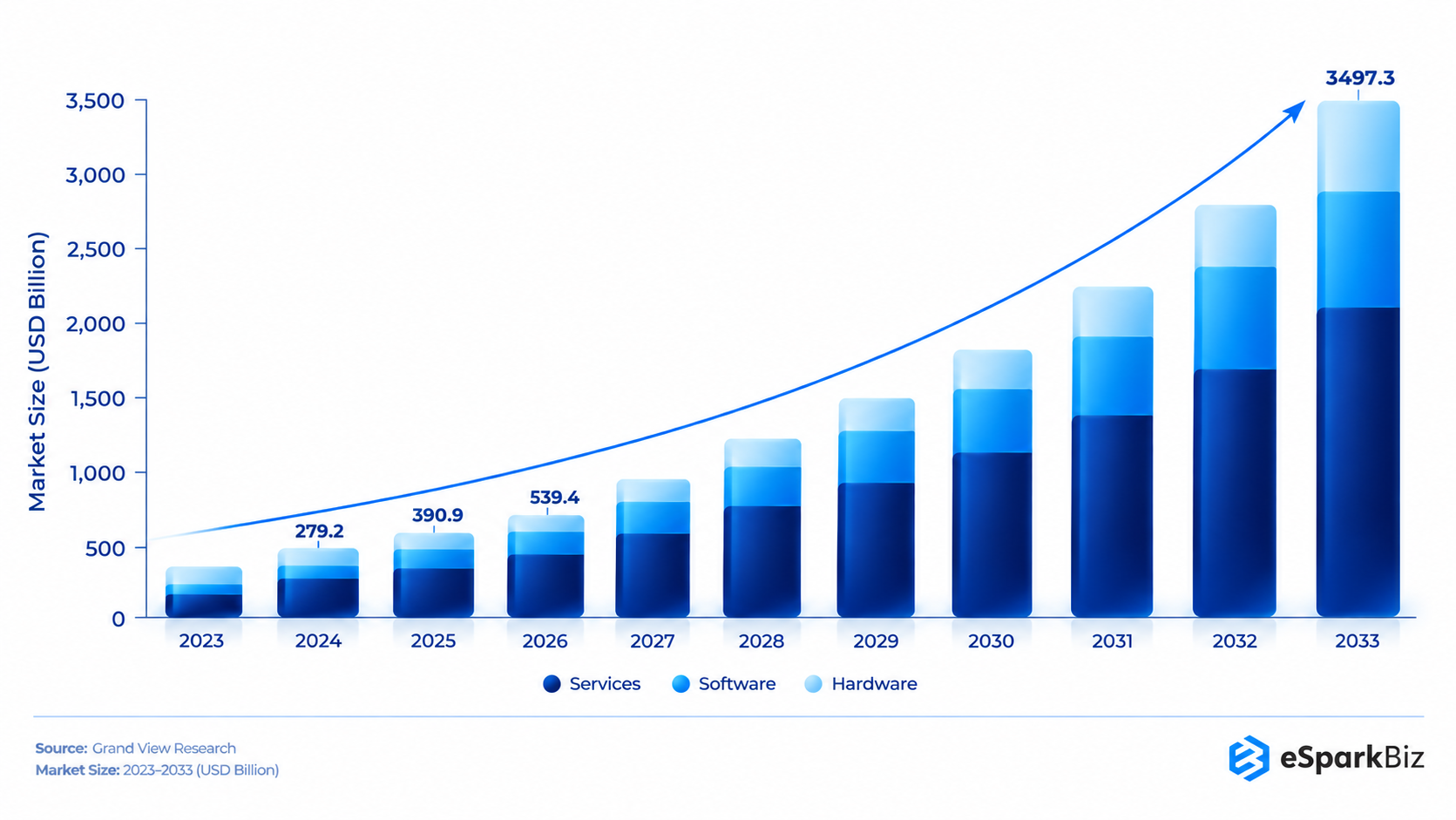
The Global AI Market is expected to grow from USD 539.5 billion in 2026 to USD 3,497.3 billion by 2033, according to Grand View Research, which is consistent with the rate at which developers are adopting AI.
This article highlights some of the most common use cases of Artificial Intelligence in software development, along with the tools that can help to implement these technologies.
How Does AI Generate Code from Plain Instructions?
AI code generation converts instructions into executable code, reducing the effort required by developers in writing code repeatedly.
- Faster completion of repetitive activities such as CRUD operations, API integrations and testing
- Improves suggestions as the tool sees more of your codebase
- Helps small teams build a first version of a feature faster
- Works best in short sprints where speed matters more than polish
GitHub Copilot, Tabnine and Cursor run inside common code editors. The table compares three assistants that enterprise teams ask about most.
| Tool | Best Use Case | Security Controls | Pricing Model |
| GitHub Copilot | Inline suggestions and chat in the editor | Admin policies and audit logs on business plans | Per seat, monthly. Business about $19 and Enterprise about $39 |
| Cursor | Multi-file edits in an AI-first editor | Privacy mode and org controls on team plans | Per seat plus usage limits. Teams about $40 |
| Claude Code | Larger tasks across a repo from the terminal | Permission prompts and SSO on team plans | Seat plan or API usage |
Beyond Code Generation
A discussion in r/n8n points out that most successful applications of AI are document processing, workflow management, knowledge agents, customer service and reporting, rather than programming alone.
Automated Testing and QA without the Manual Backlog
AI testing tools read code changes and draft test cases automatically. They can catch bugs that are hard to spot in manual review. Regression tests update as the codebase changes, so coverage grows without constant effort. That matters most for teams that ship often, because manual testing cannot keep pace with frequent releases.
Testim keeps UI tests stable as screens change, while Diffblue generates unit tests for Java code. Teams short on QA capacity can pair these tools with software testing services.
AI as an Industrial Revolution
“If our era is the next Industrial Revolution, as many claim, AI is surely one of its driving forces.”
– Dr. Fei-Fei Li, Creator of ImageNet
AI Code Review and Bug Detection Before Code Ships
AI reviews pull requests faster than a human and never tires, but it does not replace a senior engineer’s judgment.
- Flags risky patterns, hardcoded passwords and style problems before code merges
- Scans each commit as it lands, with no extra trigger
- Suggests fixes based on commit history and past bug patterns
GitHub Copilot code review, Codacy and Snyk Code (formerly DeepCode) handle this well. Sentry works after release, tracing production errors back to the code behind them. Senior engineers should still review core logic, because AI can miss issues unique to your codebase.
A 30/60/90-day rollout keeps your review process intact.
- Days 1 to 30. Pilot with three or four developers on one repo. Keep every human review rule unchanged and track review time and escaped bugs.
- Days 31 to 60. Add AI review to every pull request as comments only. Humans still approve, and the team logs which AI comments helped.
- Days 61 to 90. Extend to all 15 developers, add the security scan to the merge check and write down who approves what.
Judge success on cycle time, review time per pull request, escaped defects and developer satisfaction.
Where AI Agents actually get Used
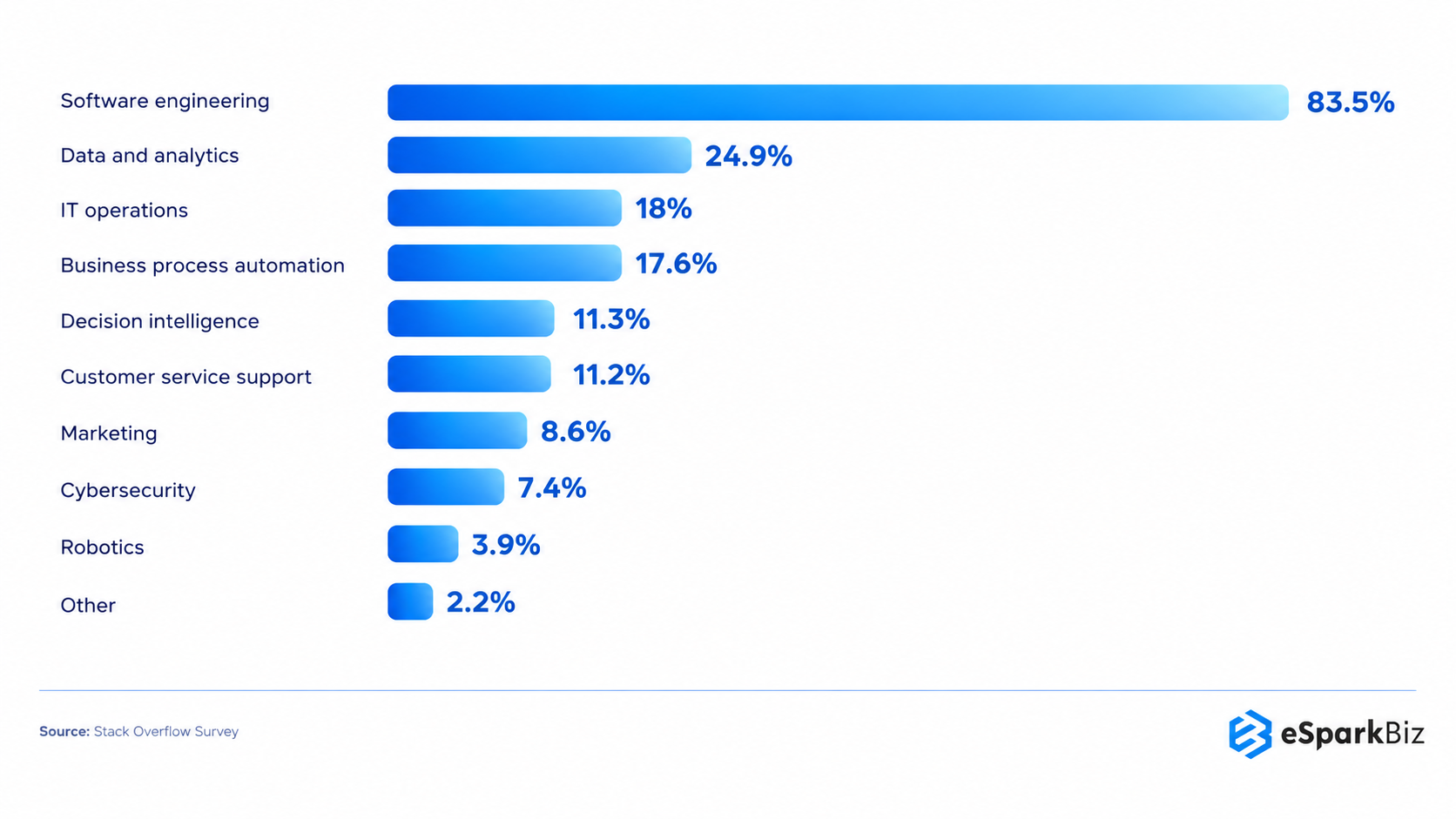
According to Stack Overflow’s Developer Survey, 83.5% of developers using AI agents at work apply them specifically to software development tasks.
Security Vulnerability Detection: Catching Risks Before Deployment
With AI, security testing can now be performed earlier, alerting about insecure coding while writing rather than during deployment.
| Detection Stage | What AI Catches | Example Tool |
| While coding | Insecure patterns and unsafe dependencies in the editor | Snyk (IDE plugin) |
| Pre-merge scan | SQL injection and insecure patterns in pull requests | GitHub code scanning with Copilot Autofix |
| Ongoing monitoring | Leaked secrets across repos and commit history | GitGuardian |
This cuts manual security effort, yet customer-facing code still needs human sign-off. Teams that want these checks inside the pipeline can add DevSecOps services.
Also Read: How Software Developers Ensure Code Quality?
Automated Documentation That Stays Current
Documentation is usually the first thing to go stale once a sprint gets started. AI steps in by creating the API documentation, code comments and system overview directly out of the codebase and then continuously updating them as changes happen.
This ensures that the documentation remains relevant instead of outdated, which is a very important aspect during onboarding since new employees would spend weeks trying to figure out decisions that were taken months ago.
Mintlify and DocuWriter.ai provide reliable methods of scanning through commit messages and pull requests and writing documentation automatically without the need for any manual effort.
Spending vs. Market Size
Worldwide spending on AI is projected to grow to $2.7 trillion in 2026, a 49.5% jump year over year, according to Gartner.
Predictive Project Management and Agentic AI for Realistic Timelines
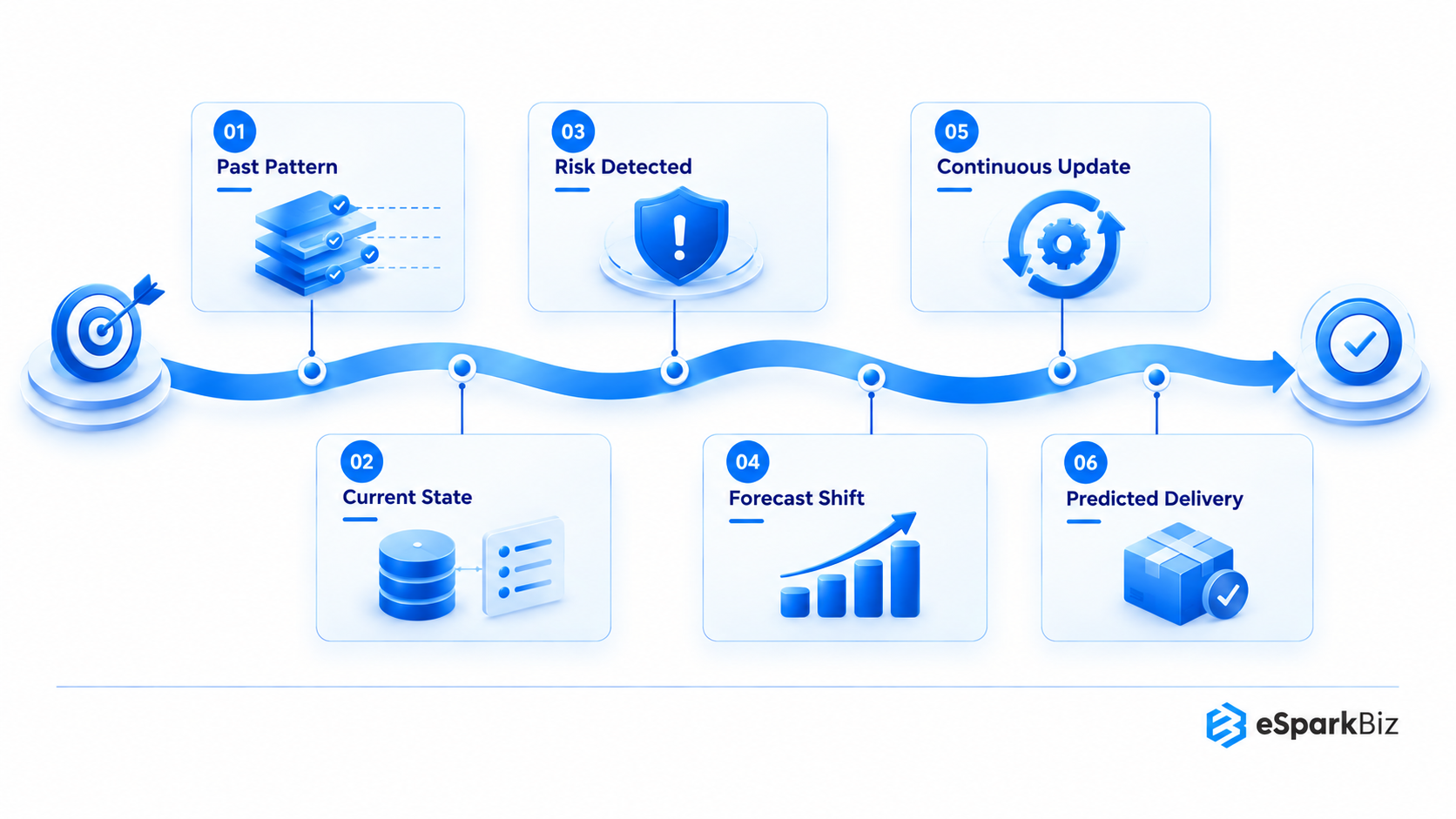
AI turns the project management and software development timeline into a data driven prediction
- Flags late deliveries early and explains the cause
- Compares past delivery data to spot risks a sprint review misses
- Updates the forecast as the project changes, not only at checkpoints
Tools like Linear gives project managers forecasts grounded in delivery data instead of assumptions.
Agentic AI use cases go a step further because the AI acts on tasks. Ticket triage agents sort and assign new issues, test agents write and run checks, and pull request agents draft changes. Each still needs a human reviewer before anything merges.
See Also: Agentic AI in Software Development: How it Works, Use Cases & Strategy
Which AI Use Case Fits Your Team First?
Match the use case to your real bottleneck instead of adopting everything at once. If your backlog is messy, CI runs slowly or pull requests wait days for review, fix those first. AI speeds up a working process and exposes a broken one.
| Bottleneck | Best-Fit Use Case | Quick Benefit | Pilot Time and Cost | Enterprise Check |
| Slow coding | Code generation | Faster first drafts | 2 to 4 weeks. Seat licenses plus reviewer time | Code privacy and data terms |
| Manual testing | Automated QA | Wider test coverage | 4 to 8 weeks. CI setup and test data | Audit trail for generated tests |
| Messy pull requests | Code review | Fewer bugs slip through | 2 to 4 weeks. Rule tuning and reviewer time | Named approver on every merge |
| Security gaps | Security scanning | Risks caught before deployment | 2 to 6 weeks. Scan tuning and security review | Policy sign-off and finding logs |
| Stale docs | Automated documentation | Faster onboarding | 1 to 3 weeks. Repo access and style setup | Access limits on private repos |
| Missed deadlines | Predictive project management | Early warning on slippage | 4 to 8 weeks. Clean ticket history | Role-based access to delivery data |
When Should You Bring in an AI Development Partner?
Off-the-shelf tools cover most coding and review needs. A partner makes sense when your team has no machine learning or large language model (LLM) skills in-house, a pilot never reached production or security review has gaps
| Factor | Buy Tools Like Copilot | Hire a Partner for Custom Workflows |
| Cost | Low per-seat entry cost | Higher upfront project fee |
| Control | Vendor roadmap decides features | Workflows match your pipeline |
| Data privacy | Depends on plan terms | Private setup possible |
| Time to value | Days | Days to Weeks for a pilot |
How Fast AI Adoption is Spreading
As reported by the latest Microsoft AI Diffusion Report, 17.8% of the global working-age population was already using generative AI tools by early 2026.
Real-World Examples: How Teams are already using AI
AI use cases in Software Development are not just academic ideas anymore. The following real life examples highlight how AI is being used currently.
- Claude now helps power more than 5 million AI agents running monthly inside Atlassian’s customer workflows, including its Rovo Chat and Rovo CLI developer tools.
- Cisco built infrastructure designed for AI model training and testing across more than 25 internal use cases.
How eSparkBiz Puts AI at Work
eSparkBiz applies AI on client builds where it removes real manual effort. Two recent projects show what that looks like in practice.
- In healthcare, a clinical intelligence platform uses AI-powered speech recognition to reduce manual documentation by 65%.
- In food service, an AI based inventory forecasting tool cut order processing time by 42% on a restaurant management platform.
Practical AI Use Cases for Businesses
This brief review considers 25+ practical applications of AI in business processes for handling text, speech, images and videos outside software development.
Conclusion
AI application within software development is no longer something that seems part of the distant future. Teams are already using it to create software faster, catch more bugs before release and enable their developers to focus on more complex tasks.
Teams that currently view AI as a crucial part of their process, and not just as a side project, will be the ones that set the pace in this age of AI development.
Frequently Asked Questions
What are people actually using AI for in software development right now?
People use AI in software development for:
- Code generation and completion
- Automated testing and bug detection
- AI based code review
- Documentation automation
- Predictive project forecasting
Will AI replace developers?
No. AI handles the repetitive parts of coding and testing well, but someone still has to decide what to build and why. That judgment call is what keeps developers in the loop.
We’re nervous about shipping AI-generated code without review. Is that actually risky?
Yes, it is risky when nobody reviews it. These five mistakes cause most of the damage.
|
Mistake |
How to Fix It |
|
Merging because tests pass |
Add edge-case tests and name a reviewer |
|
No named owner |
Make one engineer accountable for every AI-written change |
|
Rolling out to everyone at once |
Pilot with one small team and keep review rules unchanged |
|
Skipping the security scan |
Scan before merge and add a human check on customer-facing code |
|
Letting juniors accept output they cannot explain |
Pair them with a senior, require an explain-your-PR note and limit AI to drafts and tests |
We’re a five-person dev team. Is AI even worth it for us, or is this built for bigger teams?
Small teams usually experience the maximum benefits from the use of AI since AI can take up tasks of testing and reviewing, which may be hard for a small group to perform.
Where does AI actually save developers time day to day?
Developers save time with the help of AI through:
- Debugging and documentation automation
- Freeing up time for complex tasks requiring logical reasoning
- Saving time from performing repetitive scaffolding
- Minimizing context switching between different tools
We’re about to pick an AI coding tool. What should we check before we commit?
Check data handling, stack fit and false positives first.
|
Check |
Why it Matters |
|
Data handling policy |
Keeps code and data private |
|
Integration with existing stack |
Avoids workflow disruption |
|
False positive rate |
Prevents alert fatigue on the team |
Everyone claims AI speeds up development. How much of a difference does it really make?
Results vary by use case, but the teams using AI to generate code and test it constantly notice significant time saved from performing repetitive tasks, improved test coverage and faster review.
We’re comparing outsourcing partners for AI based development work. Who’s actually worth looking at?
|
Company |
Best for |
|
eSparkBiz |
Custom software built with AI across the lifecycle |
|
TCS |
Large scale AI integration for enterprise clients |
|
Capgemini |
AI-driven digital transformation consulting |
|
Infosys |
AI-powered software modernization services |
|
Wipro |
AI automation across legacy system modernization |