 ChatGPT
 Google AI
 Perplexity
 Claude.ai
Cloud migration provides lasting value when business goals lead technology decisions. Businesses must evaluate their workloads, secure critical data, select the right migration strategy, manage costs and establish governance. This guide outlines a balanced approach to minimize disruption while building efficient, secure and dependable cloud operations.
Executive Takeaway: At a Glance
- Cost: Properly scaled migrations can cut down on unnecessary cloud spending and prevent the overbudgeting of programs that have been improperly planned.
- Risk: Zero Trust and defined shared responsibility will reduce the security risks during every phase of the migration process, not only post-migration.
- Speed: The 7 Rs in workload by workload migration planning ensure there is no delay in achieving the target date.
A cloud migration strategy is a business plan that decides which applications and data move to the cloud, in what order, and under which security and cost controls. It assigns each workload one of the 7 Rs before any technical work begins.
Many migration plans treat security, costs and operations as separate concerns which makes it harder for leaders to align priorities. A stronger strategy connects:
- Security controls with workload readiness
- Cost planning with migration priorities
- Governance with operational continuity
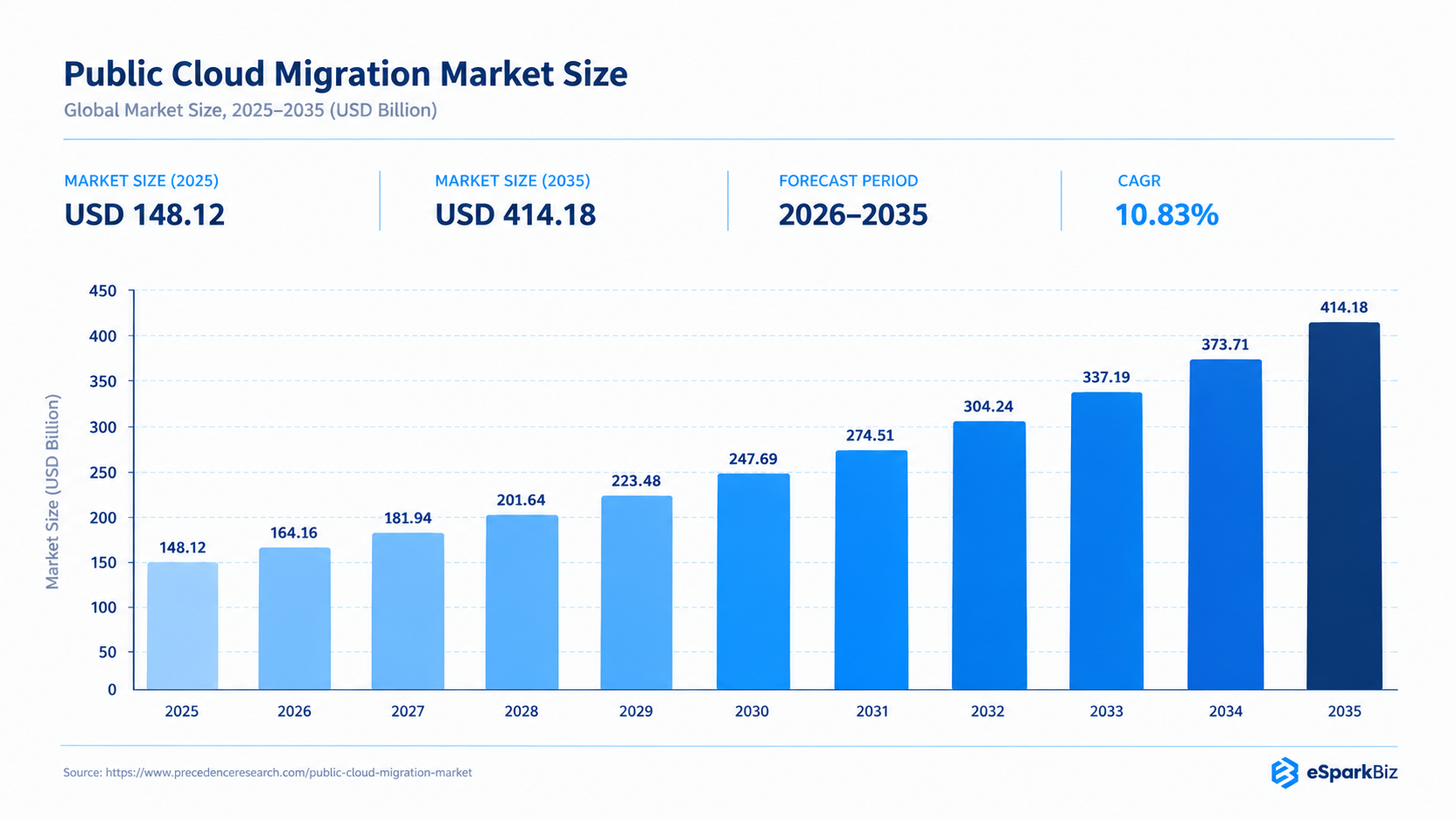
The total size of the global public cloud migration market is forecast to rise from USD 164.16 billion in 2026 to about USD 414.18 billion by 2035, growing at a CAGR of 10.83%.
This integrated approach enables decision makers to sequence their workloads, control risks and costs & gain confidence during the entire process of migration.
What a Cloud Migration Strategy actually means
Moving workloads to the cloud is just one aspect of the decision making process and that includes what to move and when and under what controls. The cloud migration strategy is the enterprise approach that sets out how these will be balanced prior to implementation.
The difference between the strategy and plan is:
- Strategy: Strategy at the portfolio level
- Plan: Plan at the workload level
- Strategy: Migration sequence and governance
- Plan: Timelines, owners, test & rollback
In addition, a strategy outlines the technical foundations that need to be in place to achieve consistency in execution. Infrastructure as Code (IaC) is utilized to handle infrastructure through machine readable configuration instead of human readable one. Another foundation could be the Identity and Access Management (IAM).
This separation allows the leaders to make portfolio decisions without getting them entangled in the process of migrating individual workloads.
Cloud Migration Challenges and Risks
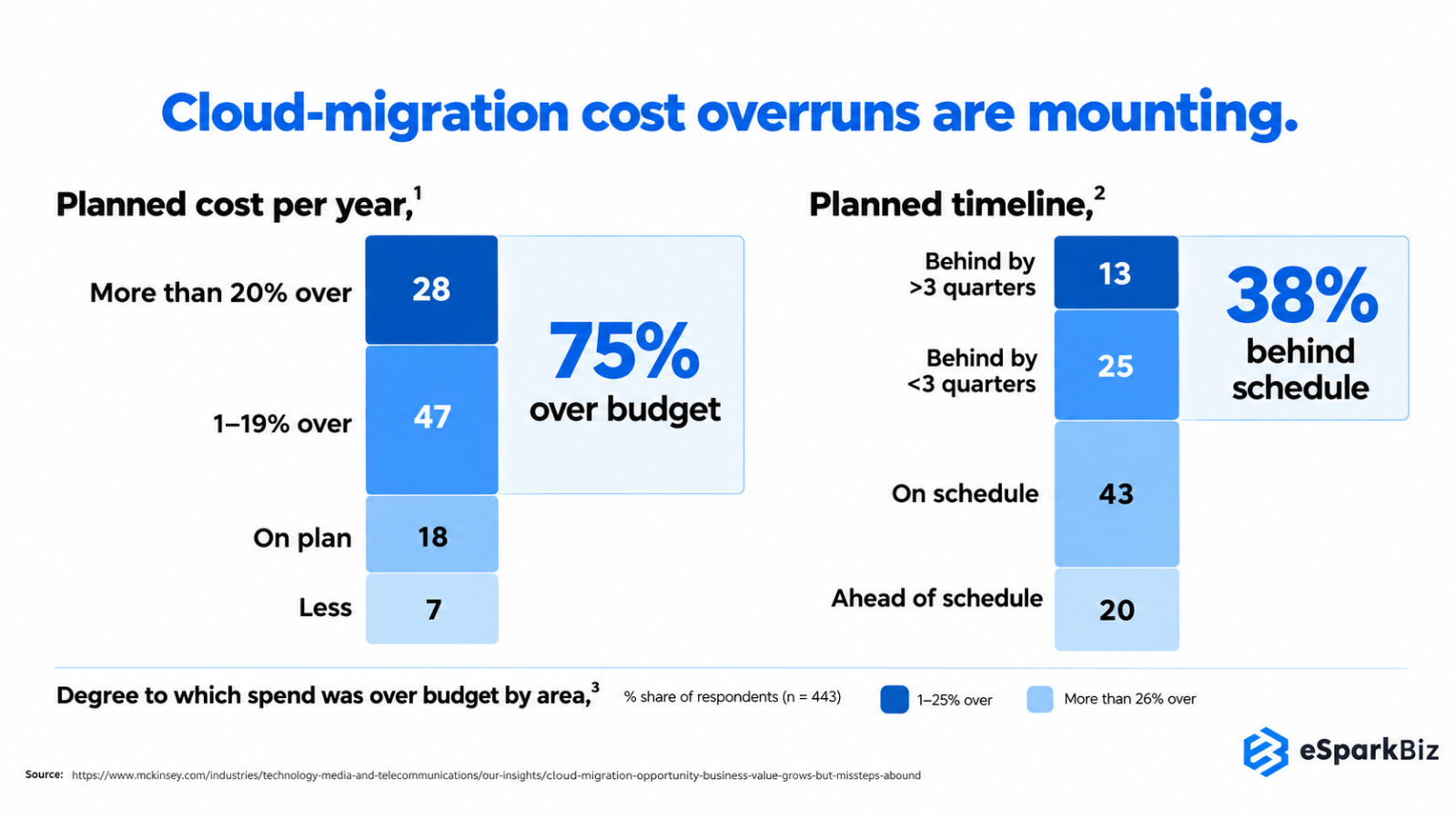
Cloud migration can put the leadership under pressure when expected efficiency meets the real world execution. Organizations may approve the move for better economics and yet face delays, unexpected costs and greater security threats. McKinsey found that the companies spent 14% more on migration than planned whereas 38% faced delays exceeding one quarter.
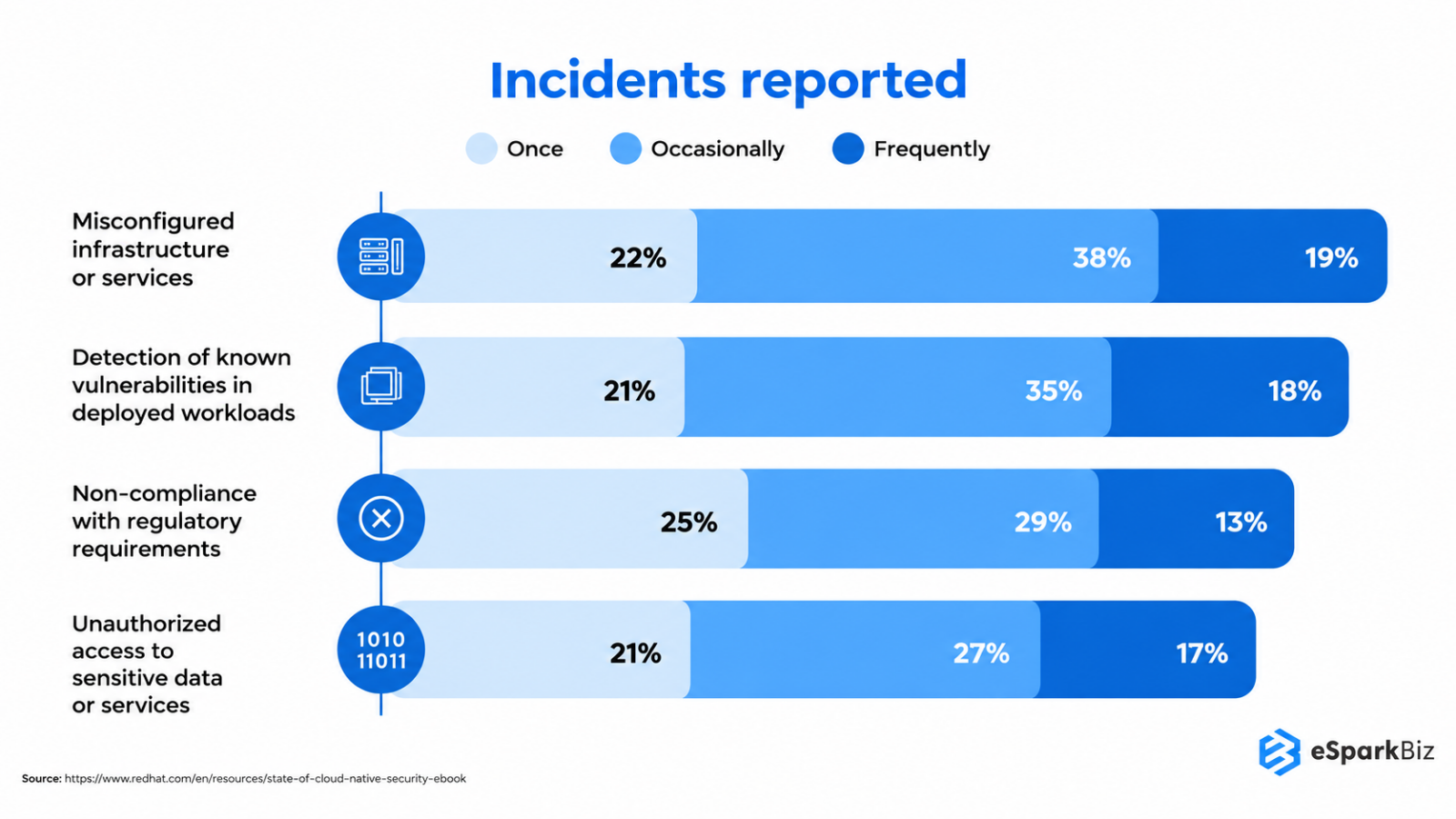
Security becomes another issue when it is done too late. According to Red Hat’s cloud native security study for 2026, 97% of companies encountered at least one cloud native security incident during the year before whereas 74% delayed their application release due to security issues.
These statistics point to an even larger problem. Poor coordination in migration choices may lead to costly consequences in the future. The usual trouble spots include:
- Budget: Unexpected migration expenses
- Timeline: Delayed business results
- Security: Incidents and delayed releases
Success for executives is not about making it to the cloud, rather, it is about moving workloads without undermining the business justification for the transition.
The table below captures a relationship between the pressures of migration and the implications for the business, allowing management to see where control is critical.
| Risk Area | Typical Trigger | Business Impact | Leadership Concern | Control Focus |
| Scope | Poor assessment | Rework | Strategic drift | Discovery |
| Dependencies | Hidden links | Service disruption | Continuity | Dependency mapping |
| Data | Weak preparation | Data exposure | Trust | Data governance |
| Skills | Capability gaps | Execution friction | Delivery confidence | Talent planning |
| Governance | Unclear ownership | Decision delays | Accountability | Operating model |
6 Warning Signs your Cloud Migration isn’t Ready
Businesses need to deal with the following alerts before migration:
| Red Flag | What It Indicates |
| No Dependency Map | Incomplete discovery |
| Unclear Ownership | Governance gap |
| No Cost Baseline | Weak business case |
| Late Security Planning | Increased exposure |
| Untested Rollback | Recovery risk |
| No Success Metrics | Value uncertainty |
Identifying these areas before migration allows for avoidance of unnecessary costs, disruption, risk and failed migrations.
How to Prioritize Workloads for Cloud Migration
Migration of all workloads does not have to be done simultaneously. Prioritize your workloads according to its business values, readiness, risks and migration economics before choosing an appropriate migration approach.
| Factor | Weight | Assessment |
| Business Criticality | 25% | Revenue impact |
| Technical Readiness | 20% | Cloud compatibility |
| Migration Risk | 20% | Failure impact |
| Modernization Value | 15% | Business improvement |
| Cost Opportunity | 10% | TCO improvement |
| Dependencies | 10% | System complexity |
Prioritization: High-value, migration enabled workloads should be migrated first, workloads with critical flaws should be fixed before migration, while low value and high complexity workloads can be kept, replaced or removed together.
The 7 Rs: Matching the Right Strategy to Each
However, not all applications require the same migration process. The 7 Rs of cloud migration provide organizations with a useful approach for determining the business value, technical maturity, risk level and future requirements of each application that allows leaders to make careful decisions before moving to action.
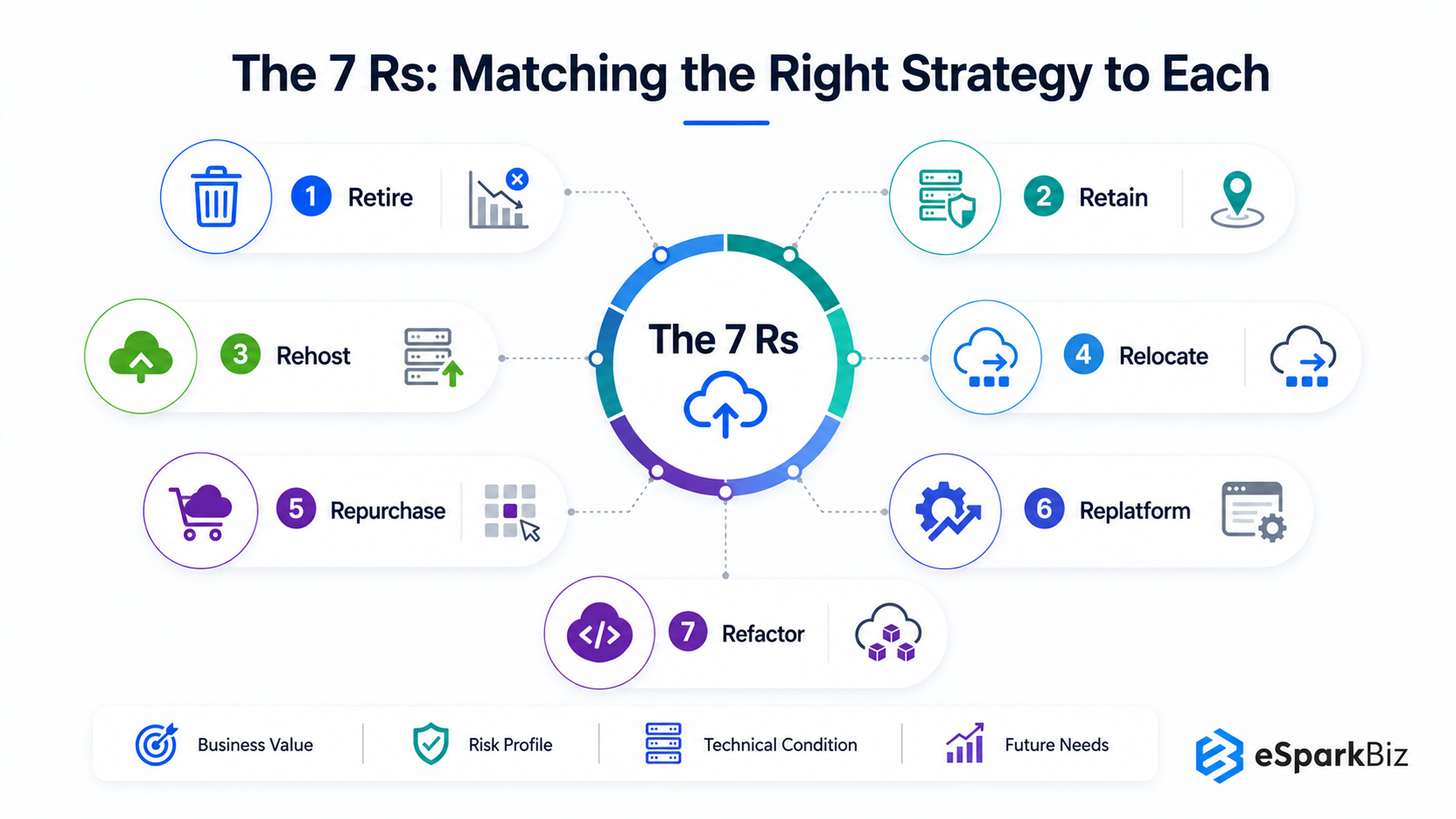
The seven approaches include:
- Retire: Remove applications which no longer add business value.
- Retain: Maintain the workload where migration does not make business sense.
- Rehost: Move with minimal changes, also called “lift and shift.”
- Relocate: Shift to a new cloud infrastructure platform with some architectural changes.
- Repurchase: Replace current system with a cloud based solution.
- Replatform: Improve the existing application without rebuilding it.
- Refactor: Redesign an application using cloud native features.
The best option will depend on the circumstances. A mission critical application could need more control than an internal system with a low risk factor. The table below illustrates the comparison between work load and execution requirements.
| Strategy | Primary Business Outcome | What Changes | Timeline | Security Implication | Best-Fit Workload | Business Risk |
| Rehost | Faster cloud transition | Infrastructure only | Days to weeks | Risks remain | Stable applications | Issues Carry Forward |
| Replatform | Improved efficiency | Platform components | 4 to 8 weeks | Provider patching | Aging databases | Integration gaps risk |
| Repurchase | Reduced ownership | Custom to SaaS | 1 to 3 months | Vendor controls | CRM, HR systems | Vendor lock-in risk |
| Refactor | Greater business agility | Architecture rebuilt | 3 to 6+ months | Greater control | Core applications | High upfront, low later |
| Relocate | Platform transition | Virtual machines moved | 1 to 2 weeks | Risks remain | VMware environments | Low risk, low gain |
| Retain | Avoid migration cost | Workload stays | Deferred | Existing controls | Compliance blockers | Compliance risk lingers |
| Retire | Reduce operational burden | Application removed | 2 to 4 weeks | Attack surface reduced | Obsolete applications | Wrong-call risk only |
For businesses moving to Amazon Web Services, an AWS cloud migration strategy applies these 7 Rs to each workload based on cost, complexity, and business needs. AWS Migration Hub and AWS Application Migration Service can support workload tracking and server migration, while AWS Database Migration Service helps move databases with minimal downtime. Choosing the right approach helps businesses reduce migration risks, manage costs, and plan a smoother move to AWS.
This enables organizations to avoid choosing a migration strategy simply based on familiarity. Rehosting can minimize disturbance, but it will have existing technical limitations. Refactoring would require higher investments but would offer more suitable options for critical applications. It might be logical to retain or retire applications when migration is too costly.
The goal is not maximum migration. Each workload needs a clear, defensible path.
Did You Know?
Google Cloud migration delivered a reported 318% ROI, demonstrating the potential financial impact of modernizing infrastructure.
Security by Design: Compliance as a Migration Rule
Compliance is a design principle, not an end point. Security should drive migration choices right from the start, impacting architecture, access, data management, monitoring and recovery. Approaching security controls in this way means there will be less remediation work to do at the end of the process.
The Shared Responsibility Model
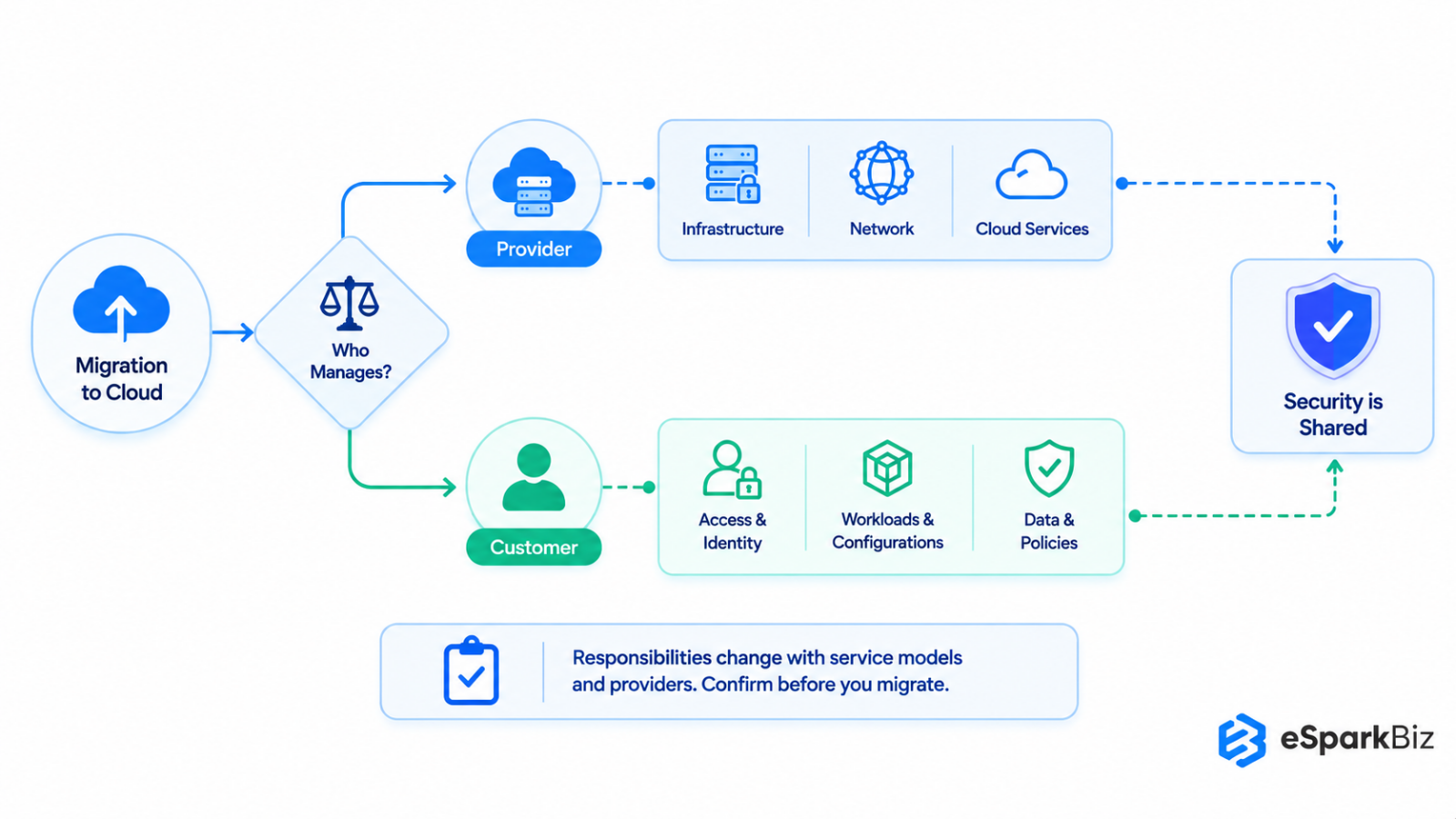
Cloud security is a shared responsibility and it is essential to know the line between cloud Service provider responsibility and enterprise responsibility when migrating. The cloud provider usually ensures the security of the underlying infrastructure, whereas the enterprise will be responsible for its own deployment and configuration.
Provider responsibilities generally include:
- Data Center Facilities and Physical Locations
- Network Infrastructure
- Cloud Infrastructure Design
Enterprise responsibilities typically cover:
- Identification, Rights and Access Management
- Applications, Computing Load and Configuration
- Data Protection, Security and Compliance Policies
The division may vary based on the service model and the particular provider. It is important, therefore, for leaders to establish the responsibilities before the migration process rather than assuming that migrating means transferring the security responsibilities to the service provider.
Expert Quote
“You have to build a business case and lay out the long term advantage and strategic benefit of a move to the cloud for the company.”
Bob Worrall – CIO, Juniper Networks
Zero Trust in Practice: Securing every Migration Phase
Migration to cloud computing affects the location of the systems, identities and data, which makes access control an important aspect during the migration process. The Zero Trust approach helps in this regard because it requires verification instead of trust.
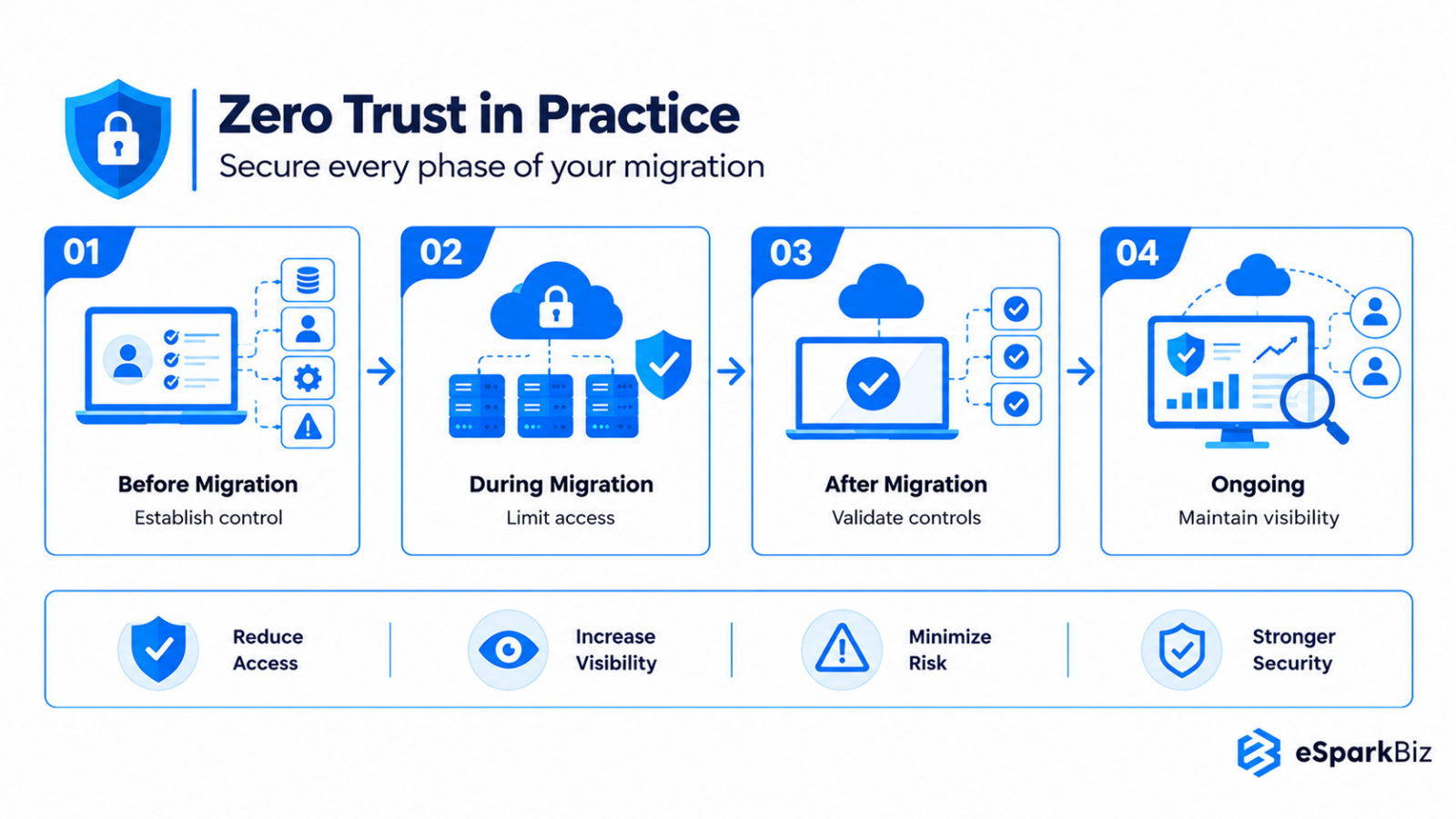
The following are the four checkpoints for a practical migration strategy:
Before migration: Establish control
Sensitive workloads, access requirements, privileged users and potential exposure points.
During migration: Limit access
Use least privilege principles for permissions, identity validation and granting access based on workload and business requirements.
After migration: Validate controls
Review permissions, monitor activity and check whether security policies are operating effectively.
Ongoing: Maintain visibility
Access should be monitored and permissions checked from time to time as loads change and demands vary.
While Zero Trust cannot protect against all threats, adopting the philosophy through all stages of migration will minimize unnecessary access and increase visibility to allow leadership to manage risk.
Example: HIPAA-Compliant Cloud Migration with minimal downtime
Consider a 200-person healthcare SaaS company migrating 200 on-premises workloads from a colocation data center to AWS. The goal is to protect patient data, meet HIPAA requirements, and avoid customer downtime.
Choosing the Right Migration Partner
Choose an AWS or Azure migration partner with proven experience in workload assessment, HIPAA compliance, data replication, and phased migration. Ensure they provide clear timelines, tested rollback plans, and post-migration support.
Planning a Secure AWS Migration
- Rehost: Move suitable applications to Amazon EC2.
- Replatform: Move PHI databases to Amazon RDS.
- Refactor: Modernize critical applications for security and scalability.
- Retain: Keep workloads on-premises until migration-ready.
Before moving PHI, sign an AWS Business Associate Addendum (BAA) and use HIPAA-eligible services. Apply Zero Trust controls such as MFA, least-privilege access, encryption, and audit logging.
Use continuous data replication, phased cutovers, and rollback testing to minimize downtime. Validate zero-downtime requirements before committing to delivery timelines.
Keeping migration efficient: Cost and Timeline together
Efficiency of cloud migration cannot be determined solely by time. Migration may be completed ahead of schedule but over budget, which will reduce the business value of the process. On the other hand, being overly focused on costs may slow down the process of migrating important applications.
A Practical FinOps View
FinOps links cloud spending to business value through three steps:
Inform → Optimize → Operate
- Inform: Track infrastructure, migration, and cloud costs.
- Optimize: Rightsize resources, remove unused capacity, and reduce costs.
- Operate: Monitor cloud usage and adjust spending as business needs change.
Why Can Cloud Costs Increase After Lift-and-Shift Migration?
Lift-and-shift migrations often move oversized VMs to the cloud without optimizing resources. Always-on instances, unused storage, data transfer fees, and pay-as-you-go pricing can make cloud bills higher than previous data center costs.
Post-Migration Cost Example
Consider a company spending $20,000 monthly on cloud services. Rightsizing oversized instances reduces costs to $16,000. Using reserved capacity for predictable workloads further lowers costs to $13,000.
This represents 35% potential savings, or $84,000 annually, showing how FinOps helps control cloud costs after migration.
Note: Figures are illustrative. Actual savings depend on workload usage and cloud pricing.
Also Read: Ultimate Guide for Optimizing your Cloud Infrastructure Cost
Realistic Migration Timelines by Organization Size
Cloud migration costs and timelines depend on company size, the number of servers, data volume, application complexity, and security needs. Small businesses may complete migration faster, while mid-size and large enterprises often need more time for planning, testing, and moving workloads.
The table below provides indicative timelines and cost estimates to help businesses plan their cloud migration budgets.
| Organization Size | Typical Scope | Indicative Timeline | Estimated Migration Cost |
| Small | Limited applications and data | 2 to 4 months | Depends on workload assessment [VERIFY] |
| Mid-size | Multiple workloads, integrations, and around 100 servers | 4 to 9 months | $50,000 – $250,000+ for a 100 server AWS migration |
| Large Enterprise | Complex portfolios, dependencies, and compliance needs | 9 to 18+ months | Requires a detailed project estimate |
How Much Does It Cost to Migrate 100 Servers to the Cloud?
For a mid-size company with around 100 servers, cloud migration may cost $50,000 to $250,000, based on an estimate. This range covers project costs such as migration tools, consulting, and cloud costs while both systems are running.
The migration may take 3 to 9 months for execution, with extra time needed for planning, testing, and approval. Complex databases, legacy applications, and strict security rules can increase both cost and time.
To get a more accurate estimate, businesses should first review server usage, data size, application dependencies, licensing, and expected cloud costs.
The goal is not to move every workload as fast as possible. Instead, businesses should prioritize workloads based on business value, technical readiness, cost, and risk. This helps teams manage their budgets, avoid delays, and see results from their cloud investment sooner.
Note: Timelines are broad planning estimates, not guaranteed delivery dates. Cost figures are in USD and exclude long-term cloud operating costs. Actual costs vary by cloud provider, migration method, and workload complexity.
Cloud Migration Phases: A Step-by-Step Roadmap
Migration into the cloud is going to be dependent not only on one major decision but on many interconnected decisions, where security, costs and implementation are inseparable. An integrated roadmap would give management the tools necessary for taking these decisions without separating security and finances.
| Sr. No. | Migration Phase | Security Action | Cost Action | Decision Owner |
| 1 | Assess | Classify workloads, identify sensitive data, review access risks and map dependencies. | Establish the current cost baseline and identify workloads with high operating or licensing costs. | CIO / CISO |
| 2 | Plan | Define access controls, compliance requirements, protection measures and recovery expectations. | Compare migration options, estimate cloud consumption and set budget thresholds. | CIO / CFO |
| 3 | Migrate | Apply least privilege access, monitor workloads, validate configurations and protect data during transfer. | Track migration spending, avoid unnecessary resources and monitor costs against approved estimates. | CISO / IT Lead |
| 4 | Optimize | Review permissions, security events, configurations and policy effectiveness after migration. | Right size resources, remove unused capacity and compare actual spending with business value. | CFO / CIO |
Why Integration Matters
These connections will help in avoiding any contradictions between these two goals. For instance, selecting the cheapest mode of migration can create problems regarding security and implementing controls without considering the workload may result in high costs.
Leadership should therefore evaluate each phase through three questions:
Is the workload secure? Is the spending justified? Is the business ready for the next step?
This creates a migration process whereby security and financial discipline support the operational process as opposed to working against it.
In-House Team or Migration Partner: Making the Call
A suitable delivery model will depend on capability rather than preference, as well as the complexity and urgency of the migration process. The in-house delivery model is feasible in case the organization has adequate capability in cloud computing, security, FinOps and migration.
The involvement of a partner like eSparkBiz adds value when internal capabilities or capacity constraints emerge especially in situations that involve complex workloads or dependency on legacy systems.
In-house may fit when:
- There is existing cloud expertise in-house
- There is a clear understanding of workloads
- The organization can commit to resources for migration
A partner may fit when:
- Specialized skills are limited
- Migration timelines are tight
- Legacy systems or complex dependencies increase execution risk
The choice must take into account knowledge transfer too. A good partner will enhance internal capability and not create dependency.
Whether performed internally or outsourced to a partner, it should give something along the lines of a migration that would be capable of handling real world loads.
Which company can migrate on-premises .NET and SQL server workloads to Azure with minimal downtime?
eSparkBiz provides Azure cloud migration services for businesses moving on-premises .NET applications and SQL Server databases to Microsoft Azure. Its cloud engineers assess legacy systems, map dependencies, and build phased migration plans around business deadlines.
For critical workloads, a migration plan may use Azure Migrate, Azure Database Migration Service, data replication, and tested cutover and rollback procedures to reduce customer-facing downtime. The team should validate application performance, data integrity, and recovery processes before the final switch.
A fixed migration timeline and zero-downtime target should be agreed upon only after assessing workload complexity, database size, and system dependencies. This helps businesses set realistic delivery milestones while keeping customer services available wherever technically feasible.
How eSparkBiz built a Sports Platform with 95% Faster NIL Fund Distribution
eSparkBiz developed a sports platform that connects athletes, universities, sponsors, and fans through secure payments, digital marketplaces, and real-time engagement.
Challenge: The client faced disconnected systems for NIL payments, compliance tracking, fan engagement, and sports collectibles. Manual processes caused delays, increased compliance work, and made transactions harder to track.
Solution: eSparkBiz built a unified platform using AWS, blockchain, and smart contracts. The solution automated athlete payouts, added secure transaction tracking, enabled verified collectible sales, and improved fan engagement through QR-based interactions and loyalty rewards.
Results
- 95% faster NIL fund distribution through automated payouts.
- 90% increase in fan engagement with real-time interactions.
- 85% reduction in manual compliance work through automated checks.
- 99% transaction transparency and traceability with blockchain records.
What does a Successful Cloud Migration look like?
The success of migration should be determined by business results and not the number of migrations performed. A workload is considered a success only if it achieves its business objectives.
| Success Area | Target |
| Business | Business continuity maintained |
| Cost | Approved TCO achieved |
| Security | Critical gaps eliminated |
| Performance | Baseline targets met |
| Resilience | Recovery objectives validated |
| Operations | Monitoring and ownership established |
The goal is not simply to move workloads to the cloud but to achieve the outcomes that justified the migration.
From Migration Planning to Cloud Readiness: The eSparkBiz Approach
A successful cloud transition requires more than selecting a migration model; it demands careful planning, workload assessment, and risk management. eSparkBiz bridges the gap between cloud migration planning and execution by aligning migration priorities with business goals. Our specialists focus on minimizing disruptions, optimizing resources, and ensuring a smooth transition to the cloud.
- Workload Dependency Mapping: Identify interconnected applications and infrastructure to prevent migration disruptions.
- Migration Wave Planning: Prioritize workloads based on complexity, business impact, and technical requirements.
- Downtime Mitigation: Implement data synchronization and fallback strategies to maintain business continuity.
- Cloud Environment Validation: Verify application performance, data integrity, and system functionality after migration.
- Migration Success Metrics: Monitor downtime, resource utilization, and costs to evaluate migration outcomes.
With its cloud migration expertise, eSparkBiz helps businesses achieve a structured, cost-efficient, and reliable cloud transition.
Conclusion
Successful cloud migration is achieved through business transformation rather than just moving technology. Security, cost considerations, governance, readiness of the workloads and sequencing help in minimizing disruptions and risks.
For leaders, success is all about creating an environment that is stable, financially aware when it comes to the cloud and creates business value.
Frequently Asked Questions
My Cloud Migration keeps getting Delayed. How can a Migration Partner help?
A migration partner who specializes in the cloud can map application dependencies, identify priorities for migration workloads, set timelines and plan testing to avoid delay due to complexity and other factors.
I’m concerned about Security Risks during Migration. How can a Cloud Migration Company help?
A cloud migration service provider is capable of assessing security threats, defining access controls, securing data in transit and validating cloud configurations to minimize exposure during workload migrations between different clouds.
I’m Struggling with Legacy Applications during Cloud Migration. How can a Migration Specialist help?
A cloud migration professional is capable of analyzing legacy dependencies, spotting compatibility problems, recommending appropriate methods for migration and formulating a plan for a gradual transition process.
What is a Cloud Migration Strategy?
Cloud migration strategy is the process that involves moving applications, data and infrastructure to cloud based environments considering several factors like business drivers, security aspects, costs, risk management and governance.
How long does a Cloud Migration take?
The migration timeline depends on the size of the organization and the complexity of the job to be done. Some organizations might require months, others even longer than a year.
How does Zero Trust support Cloud Migration?
In the Zero Trust model, users, devices and workloads must be continuously verified. Implementation of the least privilege access control and monitoring during the migration process can minimize unnecessary exposure.
What is the shared responsibility model?
Under the shared responsibility model, the cloud provider and the enterprise share the responsibility of securing resources. The providers generally secure infrastructure while the enterprises secure data, identity, applications and configurations.
Does moving to the cloud make an organization more secure?
Migrating to the cloud doesn’t mean that an organization is becoming more secure. It all depends on security configuration, access, monitoring, governance and responsibility management.
Does eSparkBiz offer US-based contracts, migration cutover support, and SLAs?
Yes. eSparkBiz has a US entity offering local contracts and defined SLAs. It provides 24/7 cloud support; confirm cutover coverage hours in your agreement.
What information is needed for a cloud migration cost estimate?
A cloud migration cost estimate requires details about existing infrastructure, workload size, data volume, cloud platform, security needs, and migration timeline. These inputs help estimate costs and plan resources accurately.
Should enterprises migrate every workload to the cloud?
No. Workloads should be evaluated depending on their commercial value, technical state, risk and future needs. In some cases, workloads can be kept or acquired again.