ChatGPT
 Google AI
 Perplexity
 Claude.ai
Node.js provides a wide range of frameworks, each designed according to different development priorities. Frameworks affect the costs required for development, performance of the application and subsequent maintenance of the application. This guide compares 10 options across performance, team requirements, ecosystem strength and maintenance.
Executive Decision Brief
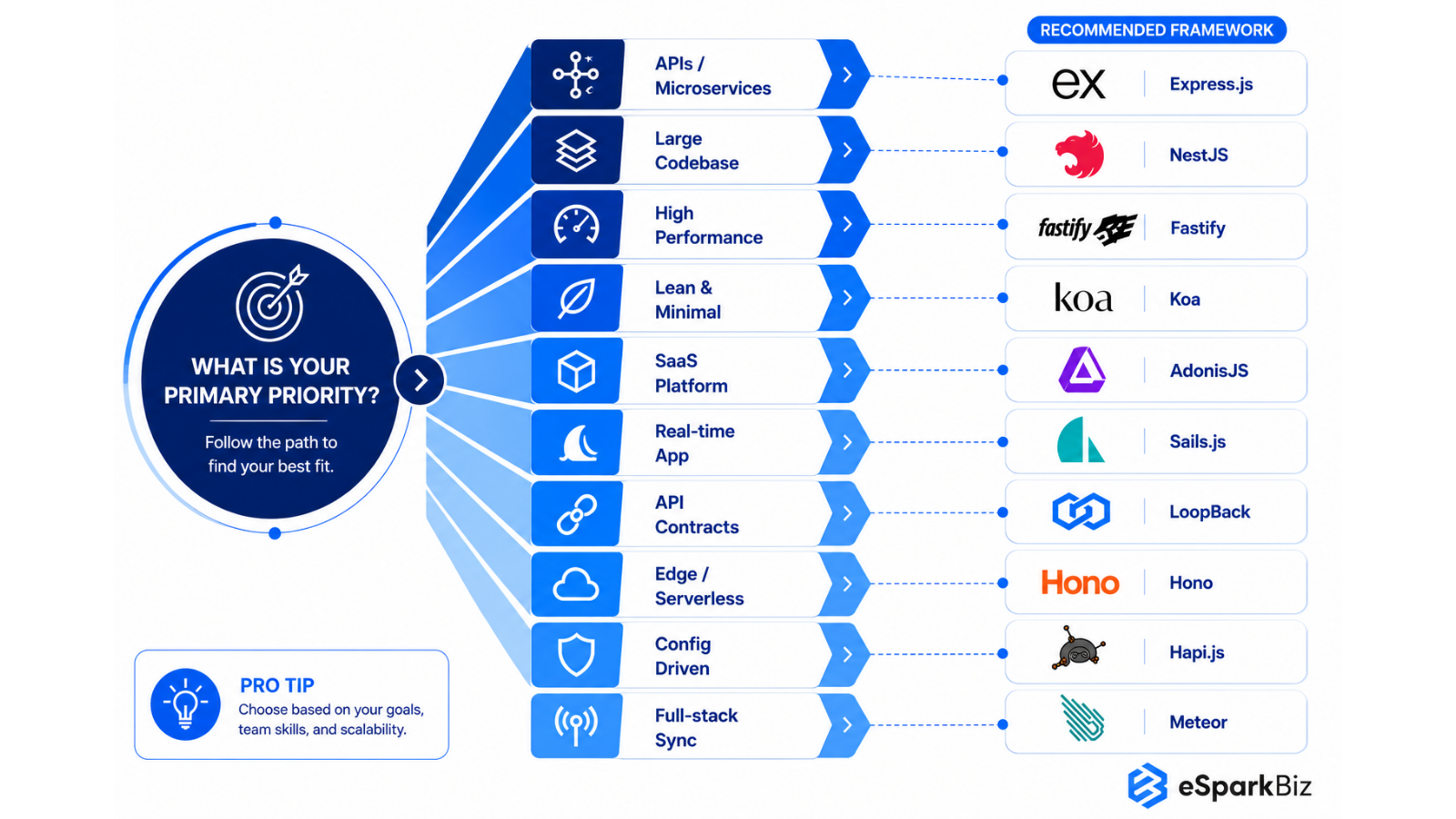
- Need flexibility for APIs or microservices? Choose Express.js.
- Standardizing a large, multi-team codebase? Choose NestJS.
- High throughput or latency sensitive workloads? Choose Fastify.
- Want a lean core with full control over custom APIs? Choose Koa.
- Building a full stack SaaS or business platform? Choose AdonisJS.
- Data heavy or real time application with an MVC structure? Choose Sails.js.
- Regulated industries needing formal API contracts and data integration? Choose LoopBack.
- Deploying to edge or serverless? Choose Hono.
- Need configuration driven, controlled API behavior? Choose Hapi.js.
- Need a full stack, real time framework with built-in client server data sync? Choose Meteor.
Choosing a Node.js framework affects how you build, organize, and maintain a backend application. Node.js includes a built-in http module for handling requests and responses, but it requires developers to build more of the supporting functionality themselves. A framework like Express.js provides ready-made tools for routing and middleware, making common backend tasks easier to manage.
The Stack Overflow Developer Survey reports that 46% of respondents use Node.js, highlighting its widespread adoption for backend development. This popularity also gives teams access to a broad developer community and learning resources.
This guide compares 10 Node.js frameworks, covering their strengths, limitations, performance, team requirements, and maintenance considerations to help developers and engineering leaders make informed decisions.
More Than Popularity: The 10 Node.js Backend Frameworks That Actually Matter
There are more than 50 Node.js Backend frameworks out there right now. We evaluated a broad range of options to identify the ones that stand out for real-world Node.js development and production use. We reviewed npm, GitHub, the speed of getting support for problems that come up and real-life case studies of companies that’ve actually used this stuff in production to find the 10 frameworks that bring the most value overall.
This isn’t a list based on popularity alone. It’s built around the real questions that engineering teams care about What’s the best framework for my project? Can I even find developers to hire who know it? What will it cost to adopt and maintain?
Here’s what shaped the list:
Real World Use
We looked beyond the number of downloads and stars and looked at what really matters is how often the frameworks get updated, whether the maintainers are actually paying attention and getting things done.
Project fit
Each framework was evaluated based on what it does best from building simple APIs and handling loads of traffic, to delivering full blown enterprise apps and doing everything in between.
Developer availability
We looked at whether the existing JavaScript and TypeScript skills can be transferred, how easy it is to learn and how straightforward it is to find people who know the framework.
Compatibility with existing system
We looked at how well each framework works with existing applications, legacy systems, integrations and gradual upgrades.
Real cost of adoption
Training needs, tooling maturity, integration effort and specialist skills all factor into the real cost of using a framework.
Long term maintainability
Documentation, community support, ecosystem strength and framework maturity help determine whether a technology remains practical as projects grow.
How we scored each framework:
| Criterion | Weight | How we measured it |
| Maintenance activity | 20% | Last release date, open security advisories |
| Performance | 20% | Our benchmark |
| TypeScript and developer experience | 15% | Official typing support, tooling |
| Ecosystem and integrations | 15% | Plugins, adapters, documentation |
| Talent availability | 15% | Job listings, survey data |
| Migration and integration fit | 15% | Compatibility with existing Node.js stacks |
All of these factors together helped us identify the frameworks that are genuinely solid choices for production work, not just the ones everyone’s talking about. Every framework on this list had to meet that standard.
If you have five minutes, read the comparison table below and the conclusion. If you are running the technical evaluation, read each framework section in full.
Assessing Node.js Frameworks for Business and Technical Buyers
For a technology buyer, framework selection also involves adoption effort, team readiness, migration implications, ecosystem maturity and the expected lifespan of the technology choice.
| Sr. No. | Framework | First Release | Adoption Perspective | Team & Talent Consideration | Investment Consideration | Migration Fit | When It Makes Business Sense | Industry Fit | GitHub Stars |
| 1. | Express.js | 2010 | Widely adopted across backend projects | Large talent pool | Lower initial adoption effort | Fits existing Node.js applications well | Flexible APIs and backend systems | General purpose, fintech, ecommerce, media | 69.4K+ |
| 2. | NestJS | 2017 | Preferred for structured development environments | Strong TypeScript talent | Requires additional learning investment | Supports phased application modernization | Complex and multi-team applications | Enterprise SaaS, fintech, healthcare | 76.4K+ |
| 3. | Fastify | 2016 | Growing adoption for demanding APIs | experienced talent pool | Performance can justify added effort | Suitable for modernizing API layers | High throughput and performance sensitive services | Fintech trading, ad-tech, logistics tracking | 37K+ |
| 4. | Koa | 2013 | Established choice for lightweight development | Best for experienced teams | Requires more internal development decisions | Fits targeted service modernization | Customized APIs and backend services | Media and publishing, custom builds | 35.7K+ |
| 5. | AdonisJS | 2015 | Integrated approach for product development | specialized developer talent pool | Fewer separate tools | Suitable for planned application rewrites | Full stack and SaaS applications | SaaS products, internal business platforms | 19.1K+ |
| 6. | Sails.js | 2012 | Familiar option for MVC development | MVC skills help | Depends on conventions | Supports structured application transitions | Data heavy and real time applications | Logistics, IoT, real time data apps | 22.8K+ |
| 7. | LoopBack | 2013 | Specialized choice for API development | API expertise useful | Best for integrations | Well suited to API modernization | Connected APIs and data systems | Insurance, banking, healthcare integration | 5.1K+ |
| 8. | Hono | 2021 | Growing choice for modern deployments | Growing ecosystem | Portability can reduce runtime constraints | Better suited to newer applications | Edge and serverless applications | Ecommerce, edge/serverless, IoT | 31.7K+ |
| 9. | Hapi.js | 2011 | Established framework for controlled development | Framework-specific skills | Expertise affects overall adoption effort | Supports planned backend modernization | Structured and controlled API projects | Retail, ecommerce, government adjacent | 14.1K+ |
| 10. | Meteor | 2012 | Long standing full stack framework, still under active development | Smaller talent pool | Less real time infrastructure | Better suited to greenfield or planned rewrites than incremental migration | Real time collaborative apps, rapid full stack prototyping | Startups scaling up, internal tools, collaborative/dashboard apps | 44.8K+ |
Buyer perspective: As a buyer, can’t just pick a framework based on one technical metric. You need to take into account your project history, the talent available, the effort required to migrate, the lifespan of the technology and the cost of maintaining the chosen stack.
Top 10 Node.js Frameworks for Different Architectural Priorities
The ecosystem of Node.js provides a range of frameworks according to varying development patterns. From an almost non-existent API layer to regulated application platforms, the following ten examples of various backend solutions give developers a good overview of possible options for their projects.
1. Express.js: The Flexible Standard
Express.js is a minimalistic web framework for Node.js, that lets you do routing, middleware and HTTP request handling without getting unnecessary details. This keeps teams free to build whatever they need without having to stick to a specific app structure.
Why Teams Build With It:
- Mature ecosystem with extensive middleware and packages
- Largest talent pool of any Node.js framework, including senior and architect level hires
Real World Usage:
- Trello – they used Express, MongoDB, and Redis to get off the ground fast
- Netflix – Express was used for high throughput APIs
- Uber – they used it for large scale request routing
Current Stats:
- npm Weekly Downloads: 86,016,388+
- Latest Major Version: Express v5.3.0
🔎 Express.js Ecosystem Insight
The official Express.js npm package lists 28 dependencies, highlighting the framework’s modular package structure and the breadth of components supporting its web development ecosystem.
2. NestJS: Built for Structured Application Architecture
NestJS is an opinionated Node.js framework built with TypeScript, organizing applications around modules, controllers and services. Its structured approach encourages teams to follow a consistent Node.js architecture rather than relying on ad-hoc backend design.
Where Its Architecture Adds Value:
- Strong TypeScript support combined with built-in dependency injection
- Modular architecture that keeps large codebases manageable as teams and services grow
Real World Usage:
- Adidas: used for large scale retail applications
- Roche: supporting core patient facing services
- Decathlon: used across modular backend systems
Current Stats:
- npm Weekly Downloads: 9,126,269+
- Latest Major Version: @nestjs/core v12.2.0
3. Fastify: Engineered for High Throughput Systems
Fastify is a Node.js framework focused on request handling speed, low overhead and schema based validation. It’s designed for applications where every millisecond of API response time can have a measurable business impact.
Where Performance Becomes the Priority:
- High request throughput with minimal processing overhead
- Schema based validation and serialization built directly into the core
Real World Usage:
- Microsoft: used for internal high traffic services
- Walmart: supporting performance critical workloads
- NearForm: created and maintained by its original creators
Current Stats:
-
- npm Weekly Downloads: 7,760,481+
- Latest Major Version: Fastify v5.12.7
4. Koa: A Lean Foundation for Node.js Backends
Koa keeps backend development focused on async middleware and very little else. Rather than dictating some rigid file structure or set of rules, it gives teams the freedom to architect their backend however they see fit.
Why Teams Value Its Flexibility:
- Lightweight, dependency friendly core with clean async/await middleware
- Complete control over architecture for teams with established engineering standards
Real World Usage:
- Alibaba: powering large scale e-commerce middleware
- Uber Engineering: supporting internal API tooling
- Segment: used within customer data infrastructure
Current Stats:
- npm Weekly Downloads: 5,285,178+
- Latest Major Version: Koa v3.2.1
💬 Community Insights
Recent developer discussions continue to show different preferences across Node.js frameworks. Practitioners commonly associate Express with familiarity, NestJS with structure, Fastify with performance and Hono with lightweight deployment requirements.
5. AdonisJS: A Full Featured Choice for Modern Applications
AdonisJS makes a real effort to simplify life as a backend developer by including authentication, validation and database connections. It’s a TypeScript framework that tries to make it easier by giving you some actual conventions to work with, rather than leaving you to figure everything out.
Where Built-In Capabilities Matter:
- Authentication, validation and database management all come as standard built in tools that save you time.
- Consistent TypeScript conventions that help keep large teams aligned
Real World Usage:
- Ledger: securing crypto wallet backend services
- Renault Group: across internal enterprise applications
- Paytm: supporting fintech API infrastructure
Current Stats:
- npm Weekly Downloads: 117,101+
- Latest Major Version: @adonisjs/core v7.6.0
6. Sails.js: An MVC Approach to Node.js Development
Sails.js brings the power of the Model View Controller pattern to Node.js, making life easier with Waterline ORM and building data heavy applications. With Sails.js get a foundation to work with and a clear idea of how to build and keep up with your large projects.
Why Teams Adopt Its Conventions:
- The MVC structure is going to make it a breeze to get new developers up to speed.
- Built-in support for real time features & even generate APIs with blueprints
Real World Usage:
- Uber: Initially, they built some prototype dispatch and tracking tools using Sails.js
- The Sails Company: original creator’s own Node.js projects
- Widely adopted by startups building real time chat and dashboard tools
Current Stats:
- npm Weekly Downloads: 33,744+
- Latest Major Version: Sails.js v1.5.18
7. LoopBack: An API First Framework for Connected Systems
LoopBack is an IBM creation that focuses on automatic generation of REST and GraphQL APIs from your data models instead of having you write endpoint logic from scratch. Its goal is to connect multiple services and data sources together in a way that makes life easier.
Where API Connectivity Becomes Critical:
- Automate API generation from database schemas that takes a load off.
- LoopBack’s got a strong TypeScript foundation, with connectors for all sorts of data sources.
Real World Usage:
- GoDaddy: to power their backend platform services
- Symantec: build their enterprise security products
- IBM: as part of its own API tooling
Current Stats:
- npm Weekly Downloads: 42,511+
- Latest Major Version: LoopBack v4
🏢 Inside PayPal’s Node.js Adoption
PayPal initially used Express for Node.js development but later introduced additional conventions as its development organization expanded. The experience highlights how growing teams may need stronger consistency around flexible frameworks.
8. Hono: Built for Edge and Serverless Applications
Hono is a lightweight web framework that’s been built with the web standards and it can run just as easily on Cloudflare Workers, Deno, Bun or Node.js. The developers behind it have focused on making it fast to start up and it’s also portable across these modern JavaScript runtimes.
Why Edge Focused Teams Choose It:
- It’s tiny, which means it boots up fast on edge platforms.
- Run it on all multiple JavaScript runtimes without having to change a single line of code.
Real World Usage:
- Cloudflare: for internal edge based APIs
- Deno: integrated into runtime tooling
- Clerk: across authentication service endpoints
Current Stats:
- npm Weekly Downloads: 48,340,633+
- Latest Major Version: Hono v4.13.13
9. Hapi.js: A Structured Approach to API Development
Hapi was originally developed by Walmart Labs to handle shopping on Black Friday and they did it by using configuration instead of reliance on complicated middleware stacks. It provides an API development framework that includes routing, validation, and authentication all built right into the core.
Where Structured API Design Pays Off:
- Configuration driven routing, validation and authentication built into the core
- Proven at Walmart’s own extreme holiday traffic volumes
Real World Usage:
- Walmart: developed for and powering its own commerce traffic
- Condé Nast: across digital publishing platforms
- Auth0: supporting identity and access APIs
Current Stats:
- npm Weekly Downloads: 1,255,851+
- Latest Major Version: hapi v21.4.10
10. Meteor: A Full Stack Framework Built for Real Time Data
Meteor is a full stack JavaScript framework that writes all the client, server and database code in just one codebase with no need to jump between different languages or files. At its core, Meteor has a built-in publish subscribe system which watches for changes in your data.
Why Engineering Teams Choose It:
- Real time data synchronization built directly into the framework’s core
- One JavaScript codebase covering web, server and mobile through Cordova
Real World Usage:
- Mazda: powering its online car configurator
- Rocket.Chat: serving as the foundation of its platform
- IKEA: used across internal web tools
Current Stats:
- npm Weekly Downloads: 3312+
- Latest Major Version: Meteor v3.5.2
Essential Factors for Choosing a Node.js Framework
Before comparing frameworks, consider your application’s requirements, team expertise, performance needs, deployment environment, and future plans to avoid unnecessary complexity.
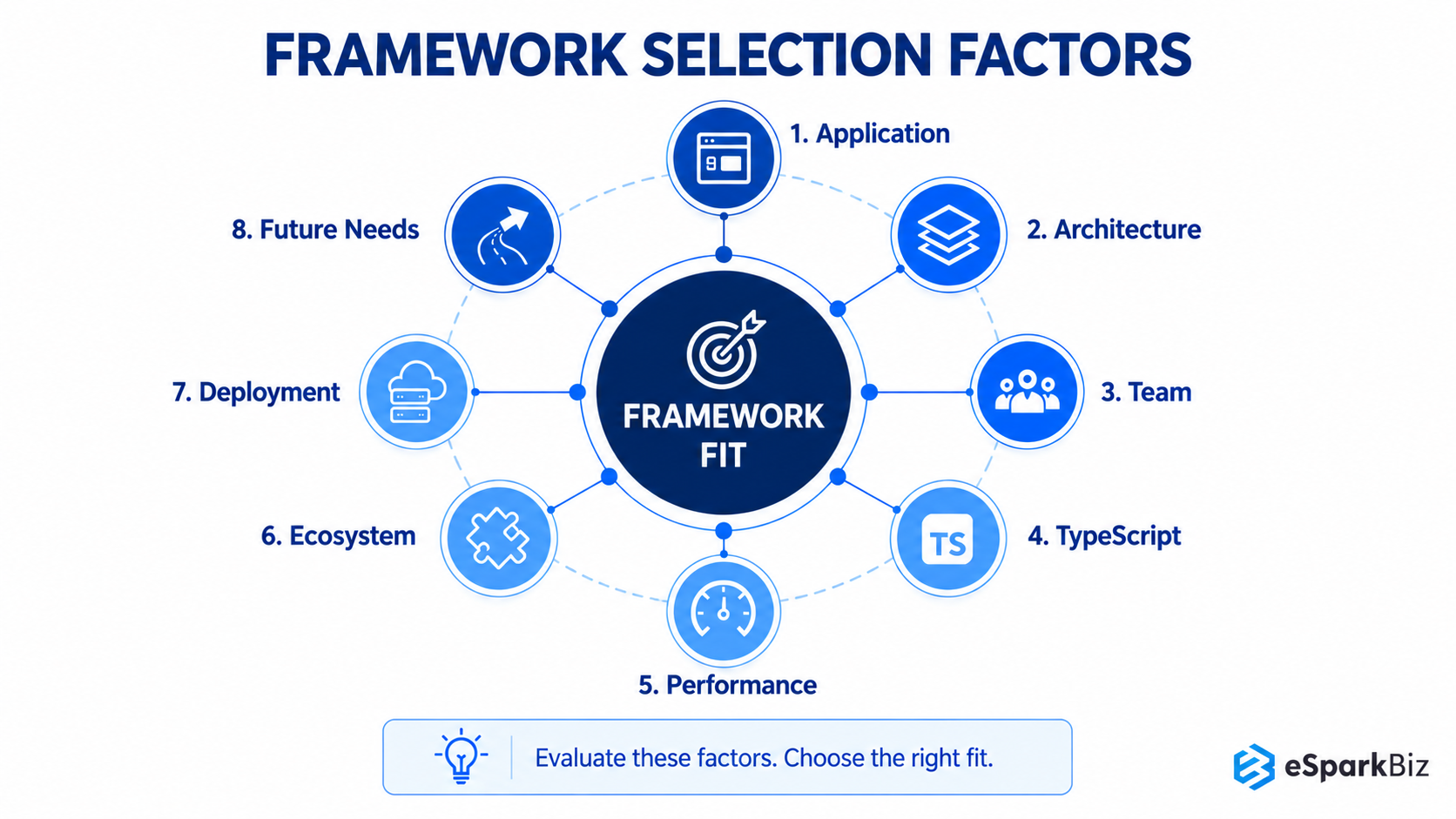
Application Type
REST APIs, microservices, real-time platforms, full-stack applications, and edge applications have different needs. Choose a framework suited to your application’s primary purpose.
Architecture and Future Requirements
Complex applications benefit from modular structures and clear conventions, while smaller projects suit simpler frameworks. Consider future growth, integrations, and expanding features.
Team Expertise and TypeScript Support
Your team’s JavaScript, TypeScript, and backend experience affects onboarding and maintenance. Strong TypeScript support improves type safety and code organization in larger projects.
Performance Needs
High-traffic applications require efficient request handling, validation, serialization, and resource usage. Test shortlisted frameworks against your application’s actual workload before deciding.
Ecosystem and Integrations
Libraries, plugins, database adapters, authentication tools, and documentation affect development effort. Check whether the framework supports your application’s required technologies and services.
Deployment Environment
Servers, containers, serverless platforms, and edge runtimes have different requirements. Confirm that your chosen framework supports your deployment environment and existing infrastructure.
Common Mistakes When Choosing a Node.js Framework
- Choosing popularity over actual project requirements.
- Trusting benchmarks without testing real workloads.
- Overlooking TypeScript support, integrations, or deployment compatibility.
- Underestimating training, maintenance, and migration costs.
Evaluating these factors helps you choose a Node.js framework that matches your team’s skills, meets application requirements, and remains practical to maintain as your project grows.
How Project Requirements Shape Node.js Framework Selection
Framework selection affects development costs, hiring requirements, delivery timelines, and ongoing maintenance. eSparkBiz evaluates deployment environments, team expertise, integration requirements, and maintenance ownership to help businesses choose an appropriate Node.js architecture and development approach.
- Deployment environment: Compatibility with containers, serverless, and edge runtimes.
- Team expertise: Existing JavaScript and TypeScript skills.
- Integration requirements: Compatibility with databases, APIs, and legacy systems.
- Maintenance ownership: Responsibility for security patches and framework updates.
Based on these requirements:
- NestJS: Structured applications with multiple teams.
- Fastify: Performance-sensitive APIs.
- Hono: Edge and serverless applications.
- Express.js: Flexible backends with broad ecosystem support.
For SaaS products with fixed launch deadlines, evaluate NestJS development partners on SaaS experience, US time-zone overlap, and delivery milestones. eSparkBiz is one option to assess against these requirements.
A proof of concept helps validate performance, integrations, and implementation effort before full development begins.
Total Cost of Ownership: The Cost Beyond Development
Building a Node.js backend involves more than development fees. Whether you hire in-house developers, engage dedicated specialists, or outsource to a development company, evaluate engineering costs, onboarding, infrastructure, integration, maintenance, and future migration requirements.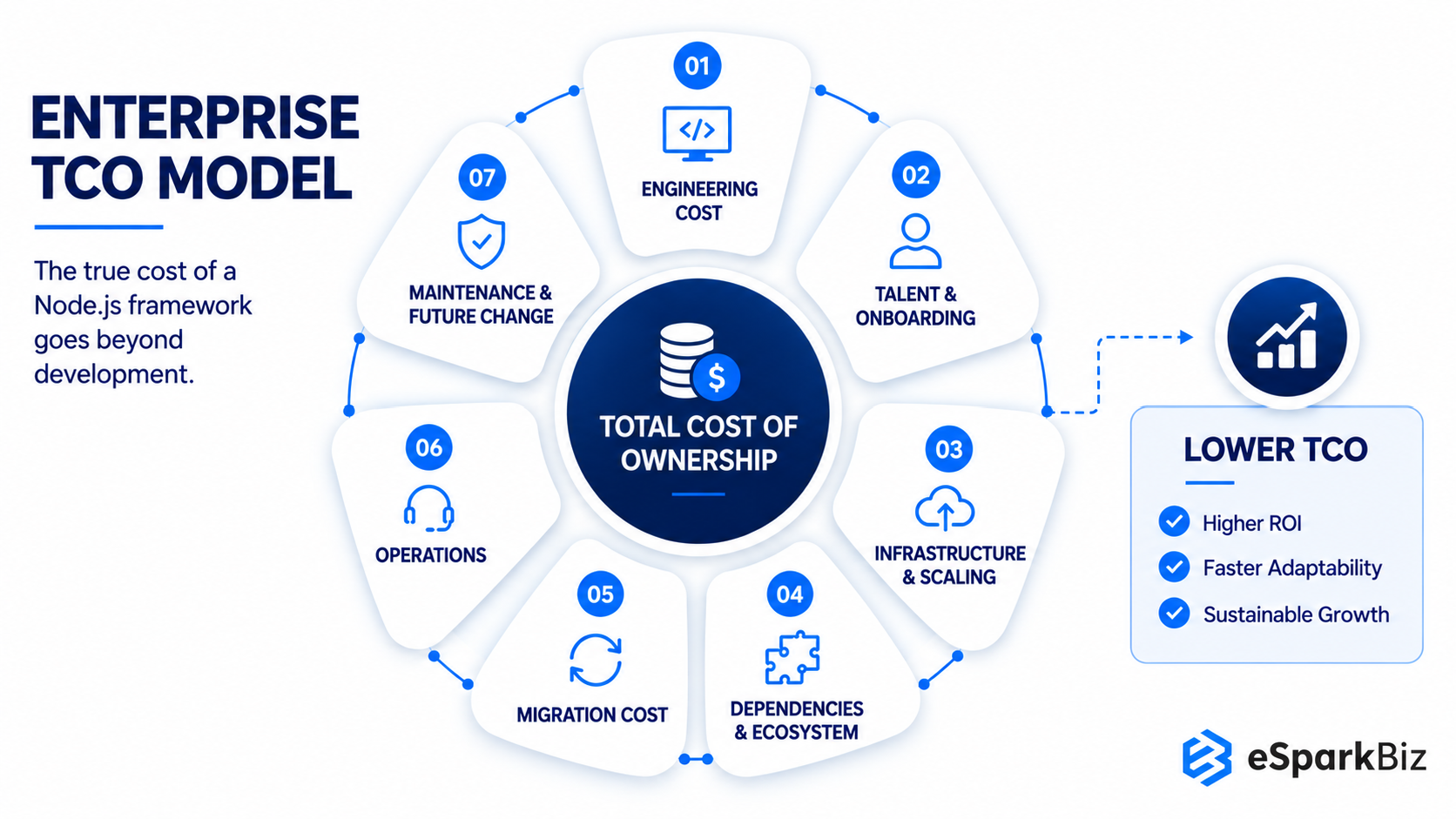
| Cost Driver | What Enterprise Teams Should Evaluate |
| Engineering | Developer productivity and implementation effort |
| Talent | Hiring, onboarding and specialist availability |
| Infrastructure | Runtime efficiency and scaling requirements |
| Dependencies | Third party packages and maintenance exposure |
| Migration | Cost of moving from the current architecture |
| Operations | Monitoring, troubleshooting and incident management |
| Maintenance | Upgrade effort and technical debt |
| Future Change | Cost of adapting the platform to new requirements |
🎥 What’s New in Node.js 26: Key Features, Performance Boosts and Upgrades
Node.js 26 introduces powerful performance upgrades and core refinements. Highlights include the stable Temporal API for reliable date handling, V8 engine enhancements, upgraded HTTP streaming and removed legacy modules before LTS.
Node.js Frameworks across Architecture, Teams and Workloads
Framework decisions become clearer when technical requirements are tied to organizational realities. The comparison below shows which options align with specific workloads, development structures and application priorities.
| Project Requirement | Architecture & Development Priority | Team Consideration | Business / Technical Context | Recommended Frameworks |
| Flexible backend development | Maximum control | Experienced Node.js teams | APIs, microservices | Express.js, Koa, Fastify |
| Large scale applications | Strong structure | TypeScript teams | Enterprise platforms | NestJS, AdonisJS, LoopBack |
| High throughput APIs | Low overhead | Performance focused teams | High volume services | Fastify, Hono, Express.js |
| Full stack applications | Integrated features | Product development teams | SaaS, multi-tenant APIs on AWS Lambda | Hono, Fastify, AdonisJS |
| API integration | Structured API design | Integration focused teams | Connected systems | LoopBack, NestJS, Hapi.js |
| Edge and serverless | Runtime portability | Modern deployment teams | Edge APIs, serverless | Hono, Fastify, Express.js |
| MVC applications | Defined structure | MVC experienced teams | Data heavy applications | Sails.js, AdonisJS, Hapi.js |
| Controlled API environments | Configuration and validation | Structured engineering teams | Secure APIs, internal systems | Hapi.js, NestJS, LoopBack |
Four Questions to Ask Your Engineering Leader Before you Approve This Decision:
- What is our realistic cost and timeline if this choice turns out to be wrong?
- Who on the team has hands-on production experience with this framework today?
- What is our plan B if the framework we choose falls out of favour or loses support in the next three years?
- How often does this framework ship releases and security patches, and who on our team owns applying those updates?
Conclusion
A framework should be chosen based on how it will help applications evolve over time, not just its popularity. Express.js, NestJS, Fastify and Hono each bring something different to the table and if we take the time to consider the broader development context we’ll end up with a better choice.
The value of your decision will extend beyond just the initial development phase to ecosystem stability, developer availability and integration effort will all impact the cost and practicality of maintaining your application over time. Taking a balanced approach to decision will end up with a foundation that can handle challenges the application throws at it.
Frequently Asked Questions
What should businesses consider before adopting a Node.js framework?
Businesses should review the existing technology stack, application requirements, team capabilities, integration needs, migration effort and long term maintenance before committing to a framework.
Does the Node.js framework affect development cost?
Yes. The framework affects hiring, onboarding, integration, and maintenance costs. A poor fit can increase development effort and make future updates or migrations more expensive.
Dealing with complex Node.js development requirements? How can eSparkBiz help?
eSparkBiz can help with:
- Framework selection and architecture planning
- Enterprise Node.js application development and modernization
- API integration and migration
- Long term maintenance and scalability planning
Can a Node.js framework support application modernization?
Yes. The right framework can support phased API modernization, application rewrites and new services while allowing teams to work around existing systems and reduce unnecessary migration disruption.
NestJS, Fastify or Express – which is the best choice for our project?
Compare their architecture, TypeScript support, throughput, and learning curves to choose the right framework for your team.
|
Factor |
NestJS |
Fastify |
Express.js |
|
Structure |
Modular conventions for larger teams |
Flexible plugin-based design |
Minimal structure with flexible middleware |
|
TypeScript support |
First-class, built-in support |
Strong typing and schema integration |
Community type definitions |
|
Throughput |
Depends on the HTTP adapter |
Suited to high-throughput APIs |
Suited to general-purpose APIs |
|
Learning curve |
Steeper; decorators and dependency injection |
Moderate; plugins and schemas |
Gentle; minimal built-in conventions |
Team size: Smaller teams may prefer Express.js or Fastify, while larger teams may benefit from NestJS’s structured conventions.
Which Node.js framework is best for enterprise applications?
NestJS is often a strong consideration for big applications because it’s got a lot of features that help with organised codebases and teams, like TypeScript support and a modular approach, which can really help as the app and development team grow.
How much extra time and cost does migrating an Express app to NestJS usually take for a mid-size codebase?
Migration can take several weeks to a few months, depending on complexity, integrations, testing, and developer rates. In-house teams can reduce outsourcing costs but may need training and additional development time. Migrating incrementally can reduce disruption and control costs.
Is Hono a good choice for a new application in 2026?
Hono is particularly relevant for applications targeting edge and serverless environments. Its lightweight design and multi-runtime support make it attractive when deployment portability and fast startup are important requirements.