ChatGPT
 Google AI
 Perplexity
 Claude.ai
Choosing a React stack for 2026 is harder than it seems, with several default settings changing such that older tutorials won’t be helpful anymore. The 3 important changes include:
- React compiler for reduced manual memoization
- Base UI using shadcn/ui as default
- Better Auth as default sign-in
The guide below ranks 20 libraries based on purpose.
It is late and your application is halfway done and you have 12 tabs open on “Best React libraries,” half of which suggest you use some packages that have been discontinued or require a new and completely different setup.
A React library provides reusable components and tools to simplify React application development. It helps developers manage UI, state, routing, and other features more efficiently.
You try one library, then another, but end up with contradictory documentation and out-of-date examples. Soon enough, an hour into your weekend project, a stack is one more problem that you have to solve.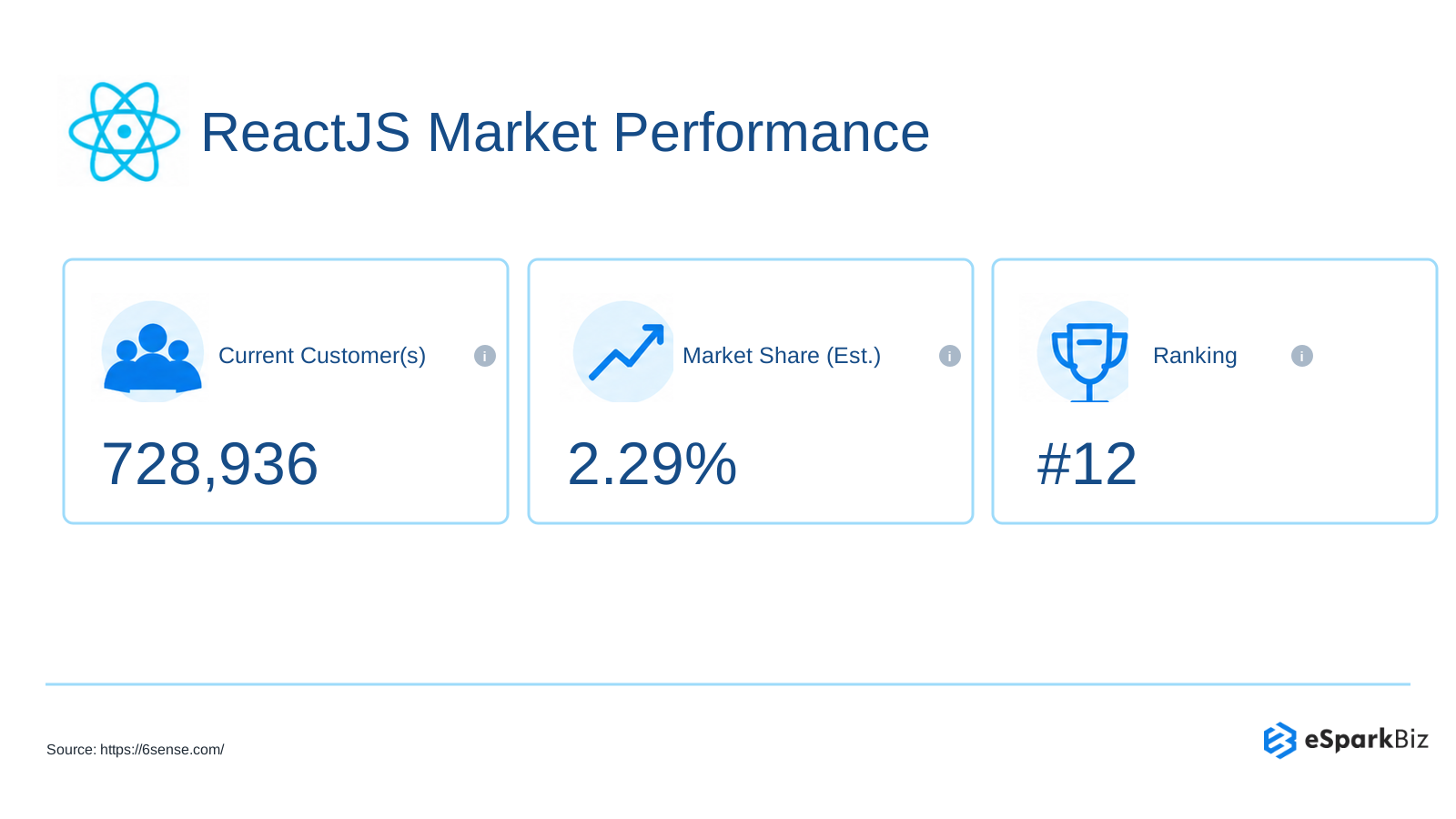
According to 6sense, React is currently used by 720,000+ websites across the web.
This list is intended for the people who are designing their own applications for the modern generation, be it freelancers, indie founders or developers. You’ll see 20 selections vetted against the npm registry and changelogs, organized based on what you are building like:
- State management & data for your server
- UI, form & animation libraries
- Testing, routing & full stack frameworks
What changed in the React Ecosystem in 2026
You recreate a setup from an old React tutorial, load the same set of libraries and the directions become incomprehensible all of a sudden. The ecosystem evolved, but the tutorial did not move forward with it. By 2026, a number of widely used utilities had changed their defaults, ownership or version numbers.
Ownership and Defaults Shifted
Famous libraries have been moved to another organization or have new default configurations:
- Auth.js: Moved to Better Auth
- Better Auth: Has declared that it is moving to Vercel
- shadcn/ui: Introduced Base UI as the default framework. Radix UI continues to be supported
This does not automatically mean that you have to leave any pre-existing project. This applies especially to situations where you are embarking on a new venture.
Major Versions moved forward
Changes occurred in the table tooling as well. TanStack Table version 9 achieved stability on, so fresh projects should not use the v8 configuration guides blindly.
Tailwind Labs revealed that they were becoming part of Shopify, but Tailwind Plus would be closed to new users. Tailwind CSS is still under an MIT license.
| Change | Before | Now |
| shadcn/ui default | Radix UI | Base UI |
| Auth default | Auth.js | Better Auth |
| Table library | TanStack Table v8 | Table v9 stable |
| Memoization | Manual useMemo | React Compiler 1.0 |
| Framework choice | Mostly Next.js | Next.js, TanStack Start |
The bottom line here is that one should do two things prior to following a tutorial. First, verify the tutorial’s package versions and second, consult the project’s up-to-date documentation.
Quick Pick: Which React Library fits your Goal?
You do not need to evaluate all libraries before starting your app. Find your goal below, then use the extra columns to narrow your options.
| Sr. No. | Goal | Library | Deciding factor | Best for | Watch for |
| 1 | Full stack apps | Next.js | Largest ecosystem | Web applications | Framework conventions |
| 2 | Type safe apps | TanStack Start | End-to-end types | Full stack TypeScript | Younger ecosystem |
| 3 | Routing | React Router | Flexible routing | Client applications | Router architecture |
| 4 | Build tooling | Vite | Fast development | React projects | Not full stack |
| 5 | Client state | Zustand | Tiny, simple API | Local state | Minimal abstractions |
| 6 | Complex state | Redux Toolkit | Structured state | Large state models | More setup |
| 7 | Server data | TanStack Query | Built-in caching | Data heavy apps | Cache concepts |
| 8 | UI components | shadcn/ui | Copy paste components | Custom interfaces | Own code maintenance |
| 9 | Ready made UI | MUI | Mature component set | Rapid interfaces | Opinionated styling |
| 10 | UI foundation | Base UI | Unstyled, accessible | Custom design systems | Less ready made UI |
| 11 | Utility CSS | Tailwind CSS | Utility first styling | Custom interfaces | Utility heavy markup |
| 12 | Animation | Motion | Declarative animations | Interactive UI | Animation complexity |
| 13 | Forms | React Hook Form | Fewer re-renders | Complex forms | Resolver setup |
| 14 | Validation | Zod | Type safe schemas | Form validation | Runtime parsing |
| 15 | Data tables | TanStack Table | Headless table logic | Custom tables | Build UI yourself |
| 16 | Charts | Recharts | React chart components | Dashboards | Complex visualizations |
| 17 | Unit tests | Vitest | Vite native testing | Unit tests | Browser testing differs |
| 18 | Component tests | React Testing Library | User focused testing | React components | Less implementation access |
| 19 | E2E testing | Playwright | Browser automation | End-to-end tests | Test maintenance |
| 20 | Authentication | Better Auth | Self hosted, plugin based | Sign-in systems | Security review |
For clarity, ‘Watch for’ is based on practical concerns, not formal ratings. Before the implementation, examine the library’s documentation, changelog and security recommendations. For use cases such as authentication, where security is critical, test the library in a smaller project first.
Frameworks, Routing and Build tools
Choosing a framework may appear to be an irreversible choice. For most projects, Next.js will be the safe option to choose, whereas TanStack Start will be a credible alternative.
1. Next.js
If you want one framework to handle most of your web app’s core pieces, Next.js is a practical starting point.
Maintainer: Vercel
RSC: Supported
Next.js is a popular React framework used to develop web applications. The routing, server side rendering and data fetching functionalities come together within a single paradigm.
Why you’d Pick it
- The default bundler for Next.js from version 16 onwards is Turbopack.
- “use cache” feature allows opting in to caching.
- The huge ecosystem provides plenty of documentation and community support.
Where it Gets Tricky
- Setting up RSC needs knowledge about server and browser execution.
- Self-hosting may require more configuration than hosting via Vercel.
Pairs well with: shadcn/ui for custom interfaces, Better Auth for authentication and Playwright for end-to-end testing.
2. TanStack Start
For full stack React with solid type safety that favors Vite based architecture, it is advisable to consider TanStack Start.
Maintainer/Status: TanStack team; built on TanStack Router, Vite and Nitro
RSC: Not dependent on RSC
TanStack Start is created by the people who built TanStack Query, TanStack Table and TanStack Router. It is a complete stack with routing and server functions, which means the frontend and backend types stay close together.
Why you’d Pick it
- Type safety from end to end may mitigate client/server conflicts.
- Nitro is able to be deployed in various host settings.
- It is a good match for the TanStack Query system.
Where it Gets Tricky
- The ecosystem is relatively young, which limits tutorials and community samples.
- The architecture is not built around React Server Components (RSC).
Pairs well with: TanStack Query for server data, TanStack Table for data heavy interfaces and Better Auth for authentication.
3. React Router
React Router is ideal for applications that require flexible routing but aren’t ready yet to embrace the constraints of an entire framework.
Maintainer/Status: React Router team, actively maintained
RSC: Experimental
React Router offers three types of routing: declarative, data and framework based. React Router’s more recent framework mode is inspired by Remix, now part of React Router v7.
Why you’d Pick it
- From basic routing onwards, add data or framework components as necessary.
- Various forms are available so you can select the right architecture for your application.
- It integrates seamlessly with Vite to create a leaner React structure.
Where it Gets Tricky
- Use of several modes can increase learning difficulty as your app grows.
- RSC support is still experimental; refer to the documentation.
Pairs well with: Vite for build tooling and TanStack Query for server side data management.
4. Vite
If you seek to develop quickly without having to use a framework, then Vite offers you the build system while keeping the architecture decisions up to you.
Maintainer/Status: Vite team; actively maintained
RSC: Not a framework feature
The main features of Vite are a fast dev server and build tool for modern web applications, as well as React Router’s Framework Mode and TanStack Start.
Why you’d Pick it
- Quick development feedback ensures rapid iteration.
- You may customize your own routing, data and rendering libraries.
- Modern React tools support React Refresh without using Babel.
Where it Gets Tricky
- The application level router and renderer have to be decided when using Vite.
- Compatibility with plugins may differ from one release to another.
Pairs well with: React Router for routing and Tailwind CSS for utility first styling.
State Management Libraries
Once the state begins seeping into different components, a single little tweak could break all three screens. Always keep client state distinct from server state. Zustand takes care of the local state without introducing any extra architecture.
5. Zustand
When you do not want to create a complicated network of providers and reducers but need some shared client side state, Zustand will keep things simple.
Maintainer: Poimandres collective
RSC: Client Components only
State is stored in Zustand using a simple function, which can be accessed using a hook. This works well for matters that are local to the app, including filters, UI settings and cart contents.
Why you’d Pick Zustand
- Its bundle size is about 489 B minified and gzipped.
- It needs less boilerplate code for most cases.
- It uses an easy-to-understand store architecture with selective access to state.
A basic store can look like this:
import { create } from ‘zustand’
const useCartStore = create((set) => ({
items: 0,
addItem: () => set((s) => ({ items: s.items + 1 })),
}))
function CartButton() {
const items = useCartStore((s) => s.items)
const addItem = useCartStore((s) => s.addItem)
return
}
In simple words: items stores the cart count, addItem changes it and the component reads only the pieces it needs.
Where it Gets Tricky
- The codebase could require more structure as complexity increases.
- According to Zustand, using its store in Server Components is discouraged.
- Time travel debugging is impossible without DevTools middleware.
Pairs well with: TanStack Query for server data and React Hook Form for form state.
6. Redux Toolkit
When your application has state that is spread out among various features in your application, then using Redux Toolkit provides patterns for managing the updates of that state.
Maintainer: Redux team
TypeScript: 5.4+
Redux Toolkit (RTK) is the official and opinionated approach to writing Redux. RTK offers structured state management and has RTK Query that helps fetch, cache and manage data from the server.
Why you’d Pick Redux Toolkit
- Patterns can be easily tracked due to their predictability.
- RTK Query helps fetch and cache data without an additional library.
Where it Gets Tricky
- Redux Toolkit entails acquiring knowledge on slices, stores, reducers and middleware.
- Its core footprint is about 13.3 kB minified and gzipped.
Pairs well with: RTK Query for server data and Vitest for testing state logic.
Data Fetching Libraries
Issues such as spinners, stale data and refresh issues can make even basic API calls turn into constant housekeeping work. Consider server-side data to be an independent layer as opposed to client-side state.
7. TanStack Query
If you keep retrieving the same API data in your application, TanStack Query removes caching, refetching and synchronization from the component.
Maintainer: TanStack team
TypeScript: 5.6+
TanStack Query manages server data through fetching, caching and syncing. It provides you with a special layer for API data rather than using server data just as client data.
Why you’d Pick it
- Keeps server data in the query cache rather than in global state.
- Provides automatic background refetching without explicit loading functionality.
- useSuspenseQuery hook usage is stable for Suspense-driven data fetching
A basic query can look like this:
import { useQuery } from ‘@tanstack/react-query’
function Products() {
const { data, isPending, error } = useQuery({
queryKey: [‘products’],
queryFn: () => fetch(‘/api/products’).then((r) => r.json()),
staleTime: 60_000,
})
if (isPending) return
Loading…
if (error) return
Something went wrong.
return
{data.map((p) =>
- {p.name}
)}
}
Simply put, your query will retrieve the products data and make it available by caching the query. The staleTime option is used by TanStack Query to keep your data fresh for one minute. You need a QueryClientProvider in your application to get this working.
Where it Gets Tricky
- staleTime defaults to 0, but gcTime is set at five minutes.
- It may be more difficult to handle related keys as the application becomes larger.
- Query cache may not have much benefit if the application fetches data only from servers.
Pairs well with: Zustand for client state, TanStack Start for full-stack React and TanStack Table for data-heavy interfaces.
Server State vs. Client State: TanStack Query and Zustand
Server state includes API data such as products, user profiles, and orders that need fetching, caching, and refreshing. TanStack Query handles this data, while Zustand manages client state like theme preferences, modal visibility, and selected filters. Using both keeps server data and UI state separate, reducing complexity and making React applications easier to maintain.
UI Component Libraries
Designing buttons and forms will silently eat up many hours in your build process. There are three approaches to choose from: styled, copy-paste and headless. Select the approach you need.
8. shadcn/ui
With shadcn/ui, you have access to the source code for any element you want to modify without having to battle against the package’s design choices.
Maintainer/Status: shadcn/ui; actively maintained
Architecture: Copy-paste code
Styling: Tailwind CSS
shadcn/ui offers UI components that you simply copy into your application instead of having to install it as a component library. The components make use of Tailwind CSS and are customizable in your codebase.
Why you’d Pick it
- You have full ownership of the component code and can style markup, behavior and accessibility.
- The Base UI is the default platform with Radix and React Aria also being available.
- It comes with component registry containing readily available blocks for interface patterns.
Where it Gets Tricky
- Component updates must be managed by you.
- Compatibility problems may arise when using incompatible components.
- Additional work is needed for adding components as compared to installing UI packages.
Pairs well with: Tailwind CSS for styling, Base UI for component primitives and React Hook Form for forms.
9. MUI
If you would like to have access to a vast library of ready-to-use components rather than constructing the interface from scratch, then MUI is what you need.
Maintainer: MUI
Design system: Material Design
Material Design is implemented by MUI using the large number of React components that make up its library. Some of the advanced features offered by the MUI library include data grids.
Why you’d Pick it
- It offers plenty of information through its large user base.
- Documentation is mature, thus making it easy to use components.
- enableCssLayer can help manage CSS precedence across styling approaches.
Where it Gets Tricky
- Its default Material Design theme may need extensive customizations.
- The component-based approach will introduce more coding than copy-and-pasting.
- Pigment CSS development is currently halted, so please refer to the current roadmap before adopting it.
Pairs well with: TanStack Query for server data and React Hook Form for form handling.
Headless UI Primitives
When your UI foundation switches tracks midway into your project, migrations may become complicated. Headless primitives afford greater control, although you need to be careful with your project’s status. Radix is still supported, notwithstanding claims of its developers focusing on Base UI.
10. Base UI
Base UI provides the basic building blocks that can be styled to suit one’s own interface needs without dictating any particular design language to one’s project.
Maintainer/Status: Base UI team; stable 1.x
Styling: Unstyled components
The Base UI components do not have any styles and you can customize them based on your needs.
Why you’d Pick it
- Base UI has become the standard primitive base for shadcn/ui projects.
- The specific packages allow adding only the components required by your project.
- It has flexible primitives, which enable you to have control over the final interface.
Where it Gets Tricky
- You might require a little more effort than working with styled components.
- It is up to you to convert the primitives into an interface.
- Switching from Radix could result in some issues.
Pairs well with: shadcn/ui for complete component patterns, Tailwind CSS for styling and Motion for animation.
Styling and Animation Libraries
It is possible for CSS to begin with elegance and conclude with files that no one wishes to work with. This is because utility styles and animated components are easier to manage.
11. Tailwind CSS
For styling that is closer to the HTML elements being styled, Tailwind CSS makes it possible for users to design interfaces with tiny utility classes rather than bloated CSS.
Maintainer: Tailwind Labs
Utility classes are used in Tailwind CSS for spacing, typography and layout utilities. In version 4, Tailwind can be initialized using one @import “tailwindcss” statement and Vite plugin, while the theme is declared in CSS.
Why you’d Pick it
- Component styling is closer to the markup rather than style sheets.
- Tailwind CSS version 4 makes configuration simpler for typical projects.
- CSS themes make design tokens more manageable.
Where it Gets Tricky
- The old v3 tutorials may not coincide with Tailwind CSS v4 onwards.
- More complex components can have longer utility class lists.
Pairs well with: shadcn/ui for customizable components and Vite for a lightweight React Development setup.
12. Motion
If you need smooth animations in your interface but don’t want to write your own animation logic, you can rely on Motion for React components.
Formerly: Framer Motion
Import: motion/react
Props that describe the movement of elements can be initial, animate and exit in motion. Support for reduced-motion is provided via MotionConfig and includes the usage of reducedMotion=”user”.
Why you’d Pick it
- Its declarative design simplifies UI animations commonly used.
- The motion/react API keeps animation logic close to components.
- MotionConfig respects reduced-motion preferences.
Where it Gets Tricky
- Animation functions make your application heavy in terms of bundles.
- A lot of gesturing can make it necessary for you to conduct cross-device testing.
Pairs well with: Base UI for interactive primitives and Tailwind CSS for styling.
Did you know?
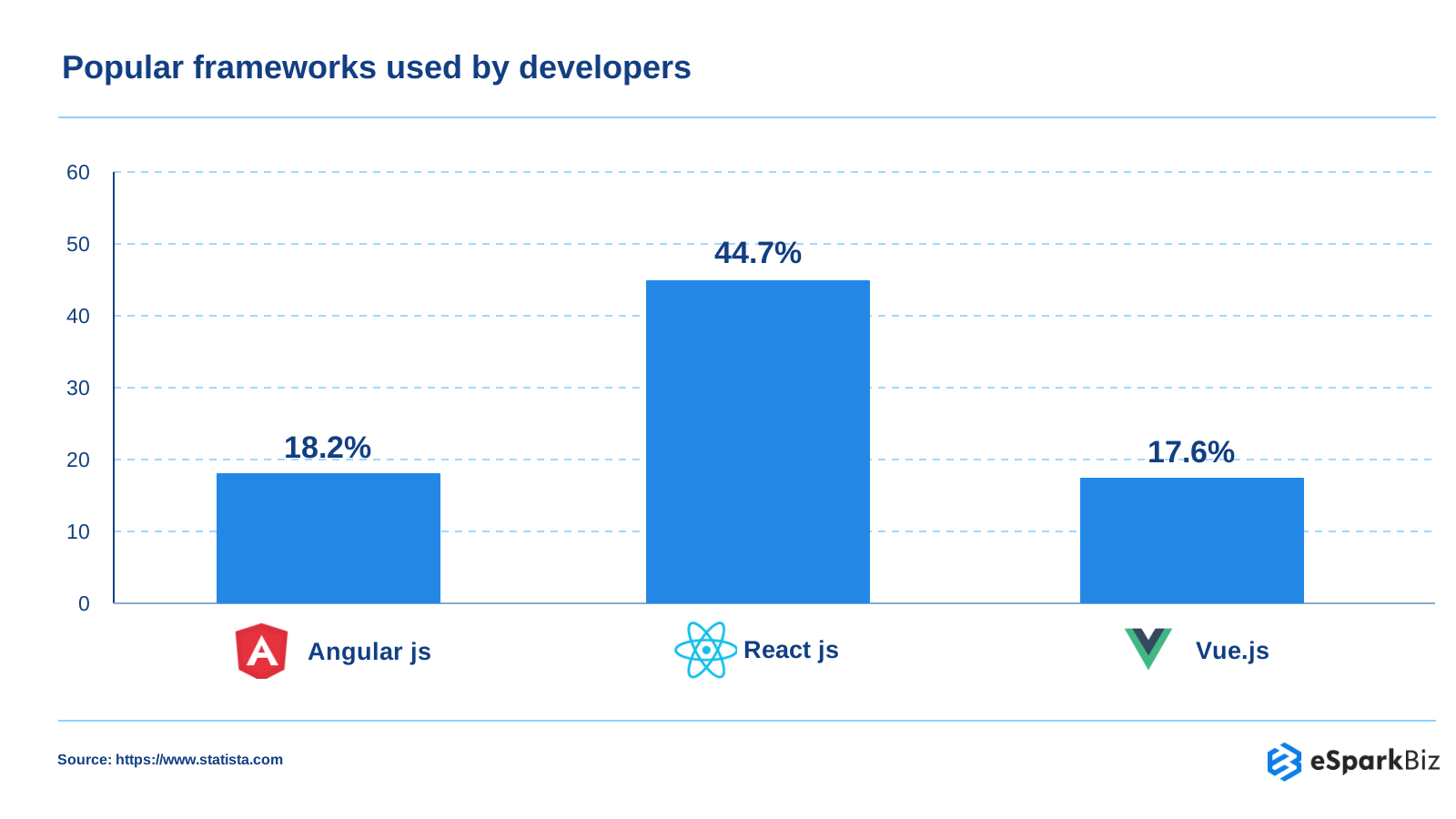
React leads developer framework usage at 44.7%, ahead of Angular at 18.2% and Vue.js at 17.6%.
Form and Validation Libraries
Re-rendering of a form with each keystroke may make typing cumbersome, particularly if more fields are involved. Uncontrolled inputs can alleviate such efforts, whereas controlled inputs provide better state management.
13. React Hook Form
If the form is slow when the user types, React Hook Form may hold the input value outside the React state until it is needed.
Maintainer/Status: React Hook Form team; v8 remains beta
Bundle size: 14.1 kB minified and gzipped
Inputs are registered with Hook Form via refs, rather than saving each keystroke to React state. It gives form-state and validation capabilities with fewer re-renders of components.
Why you’d Pick it
- Uncontrolled input in its model can help minimize the re-renders while typing.
- @hookform/resolvers connects it with popular schema validators.
Where it Gets Tricky
- More complex structures will need additional validation rules.
- Upcoming v8 breaks the field array API, be careful about migration tests.
Pairs well with: Zod for validation, shadcn/ui for form components and MUI for ready-made inputs.
14. Zod
For cases where you want to put the schema that validates both your form and your API in a single schema that is easy to read, Zod can help with that.
Maintainer/Status: Zod team; actively maintained
Bundle size: ~5.36 kB gzipped core
Zod allows for the creation of schemas suitable for type inference by TypeScript and runtime validation. You do not have to trust the data based on the TypeScript types.
Why you’d Pick it
- Validation rules are defined once and infer corresponding TypeScript types.
- Runtime validation is performed on actual user and API input.
- Zod Mini provides an alternative for smaller bundles.
Where it Gets Tricky
- Runtime validation introduces additional code to your application.
- Schemas should remain in sync with evolving backend contracts.
Pairs well with: React Hook Form for forms and TanStack Start for type-safe full-stack applications.
Table and Chart Libraries
A table that locks up at 10,000 rows will render an otherwise helpful dashboard useless while making you wait. Select table and chart tools according to your data size, interactivity requirements and need for UI control.
15. TanStack Table
When you want sorting, filtering and pagination in your table but do not want to get tied up in a certain visual style, TanStack Table offers you the logic.
Maintainer/Status: TanStack team, v9 stable since August 2026
UI: Headless
Table logic for sorting, filtering and pagination is provided by TanStack Table. It does not render the UI, which means you get to style it and define its behavior.
Why you’d Pick it
- Absolute control over UI of the table and visual appearance.
- Sorting, filtering and pagination functionality are inherent.
- The headless approach is compatible with existing components.
Where it Gets Tricky
- Table UI development is still required.
- Upgrading from version 8 to version 9 requires that the migration guidelines be followed.
Pairs well with: TanStack Query for server data and shadcn/ui for table components and styling.
16. Recharts
If you want to create commonly used charts on your dashboard without the hassle of having to create a visualization layer, you can use Recharts.
Maintainer/Status: Recharts team; actively maintained
Rendering: SVG
Recharts uses a declarative approach for creating charts based on D3 sub-modules. Rather than dealing with the internal SVG elements, you define your chart using React components.
Why you’d Pick Recharts
- Charts naturally integrate with React interfaces based on components.
- Its declarative API makes chart creation and data manipulation easy.
Where it Gets Tricky
- Transitioning from Recharts v2 to v3 entails examining migration changes.
- Large data sets may impact SVG performance.
Pairs well with: shadcn/ui for dashboard interfaces and TanStack Query for fetching chart data.
Alternatives to Recharts for React Data Visualization
- Nivo: Best for interactive dashboards requiring customizable, responsive charts and rich visualizations.
- Apache ECharts (echarts-for-react): Ideal for enterprise applications handling large datasets, complex charts, and advanced data visualization needs.
Choose Recharts for simple dashboards, Nivo for visually rich charts, and Apache ECharts for complex analytics.
Testing Libraries
You might quietly break another aspect of your app by applying a quick fix to the issue, especially when only testing the code you have modified. Perform fast unit tests frequently, but do browser-based tests on fewer occasions.
17. Vitest
For those who already have Vite set up, the testing tool, Vitest, will keep your test suite close to your application building process.
Maintainer/Status: Vitest team; actively maintained
Built on: Vite
Vitest is a Vite native test runner for unit and component tests. It allows reusing your existing Vite config and works with TypeScript, JSX and ECMAScript modules without any hassle.
Why you’d Pick it
- Uses Vite configuration and plugins for development and testing.
- Its API is similar to Jest’s, making moving test suites easy.
- Provides fast test feedback for many projects.
Where it Gets Tricky
- Vitest 5 needs at least Vite 6.4 and modifies some default settings.
- Jest projects might require some migrations.
Pairs well with: React Testing Library for component behavior and Playwright for real-browser end-to-end tests.
18. React Testing Library
In order for your test cases to be true to life, React Testing Library recommends interacting with the rendered user interface rather than the underlying implementation itself.
Maintainer/Status: Testing Library team; actively maintained
React Testing Library gives queries that allow you to query elements in a manner similar to how users interact. This methodology encourages you to write accessible code.
Why you’d Pick it
- Tests involve usability issues associated with buttons, labels, roles and texts.
- Queries with accessibility in mind can help identify poorly written markup.
Where it Gets Tricky
- Component testing may take more time than unit testing.
- The interface should be handled carefully due to loading and timing considerations.
Pairs well with: Vitest for fast test execution and Playwright for real-browser testing.
19. Playwright
In case a bug is only visible when multiple components of your application work together, Playwright enables testing the entire workflow in a full browser environment.
Maintainer/Status: Microsoft; actively maintained
Browsers: Chromium, Firefox, WebKit
Playwright performs E2E testing for all major browser engines. It is equipped with automatic waiting and tracing utilities that help in reproducing and debugging issues.
Why you’d Pick it
- Test key flows through Chromium, Firefox and WebKit.
- Auto-wait makes less manual synchronization code necessary.
- Trace information is helpful when tests fail.
Where it Gets Tricky
- Browser testing takes time as compared to unit testing.
- CI requires that browsers be installed on the machine.
Pairs well with: Vitest for fast unit tests and Next.js for full-stack React applications.
Authentication Libraries
Login/Sign-in can be one area of your app where a little error can cause some huge issues. Carefully select your authentication framework, review the security guidelines and thoroughly test the entire process.
20. Better Auth
When you require that authentication must be within your application and database, Better Auth can help you set up TypeScript-based sign-in, sessions and more auth functionalities.
Maintainer/Status: Better Auth; open source
Architecture: Framework-agnostic TypeScript
Better Auth is an authentication and authorization framework for TypeScript. It manages accounts and sessions and can be extended through plugins for other authentication capabilities.
Why you’d Pick it
- Plugins officially supported include passkey, two-factor authentication and magic links.
- Self-hosted means the authentication infrastructure and data are in your own hands.
- It is compatible with popular application frameworks.
Where it Gets Tricky
- Self-hosting will involve migrations, delivering emails and rate limiting among others.
- You must still create the sign-in form.
- Authentication involves thorough testing and setup of security.
Pairs well with: Next.js for full-stack applications, TanStack Start for type-safe full-stack apps and Zod for input validation.
🎥 Watch: 10 Best UI Libraries for 2026
React Libraries you may no longer need
Every additional dependency is something that will require updates, debugging and comprehension. Before adding a new library, see if React 19 already does the job. Many legacy practices have their own substitutes.
When React already has the Answer
Actions, useActionState, useOptimistic and use() were introduced in React 19. They can deal with form actions, asynchronous state, optimistic changes and resource fetching without any further dependencies.
| Old Approach | React 19 Option | Library Still Useful for |
| Manual useMemo | React Compiler 1.0 | Specific tuning |
| useState form flags | useActionState | Complex forms |
| Custom optimistic UI | useOptimistic | Shared cache updates |
| useEffect fetching | use() + Suspense | Client caching |
Fewer Packages, Not Zero Packages
React Compiler is capable of reducing the need for manual memoization, but it is unable to solve all performance problems. Expensive computations, too many requests and poor data flow may be among them.
The Practical Rule
React is the best option to start with. You can use any library when the default way of doing things doesn’t suffice anymore.
Common mistakes when adding React libraries
Teams often add unnecessary dependencies, choose abandoned packages, or overlook maintenance costs. Before installing a React library, check:
- Last Release: Is the library actively maintained?
- Weekly Downloads: Does it have consistent adoption?
- Bundle Size: Will it affect application performance?
- Owner: Is there a reliable maintainer or organization behind it?
Avoid libraries that duplicate React 19 features or introduce unnecessary complexity.
Expert Quote
“The open source world is filled with amazing libraries and frameworks that can help us get our software built and delivered to users quickly.”
~ Kent C. Dodds, Software Engineer and Educator
Recommended React Stacks and Switching risk
Choosing libraries is easier when you first decide what each layer of your app needs to handle.
Stacks by Project Type
A React Stack is most effective where each of the libraries serves a defined purpose. The following are some examples that do so while also separating the framework from data and UI.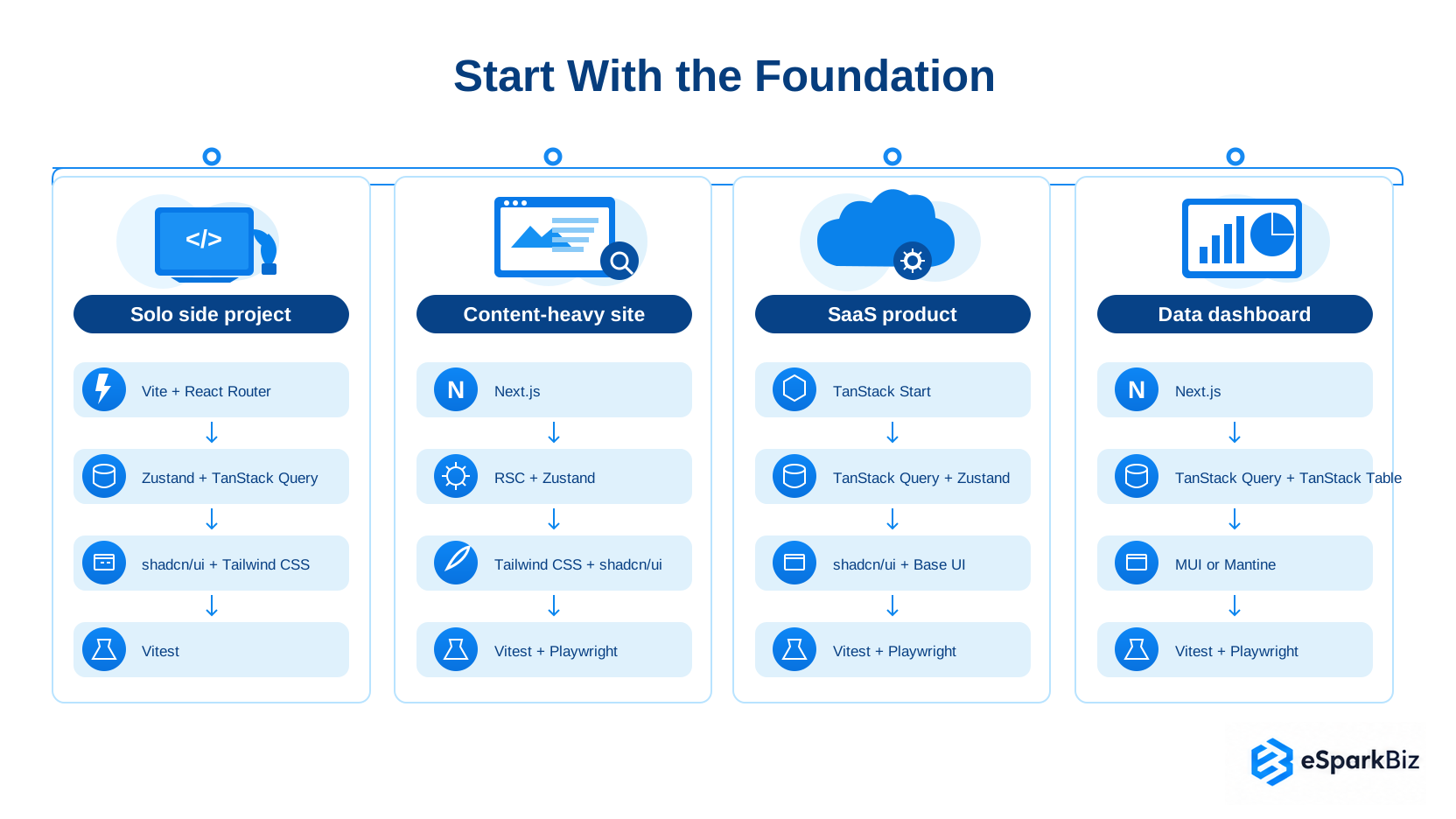
| Project | Framework | State and Data | UI |
| Solo side project | Vite + Router | Zustand, Query | shadcn, Tailwind |
| Content-heavy site | Next.js | RSC | Tailwind, shadcn |
| SaaS product | TanStack Start | Query, Zustand | shadcn, Base UI |
| Data dashboard | Next.js | Query, Table | MUI |
Start with the Foundation
Solo Side Project
Vite + React Router
↓
Zustand + TanStack Query
↓
shadcn/ui + Tailwind CSS
↓
Vitest
Content-heavy Site
Next.js
↓
RSC + Zustand
↓
Tailwind CSS + shadcn/ui
↓
Vitest + Playwright
SaaS Product
TanStack Start
↓
TanStack Query + Zustand
↓
shadcn/ui + Base UI
↓
Vitest + Playwright
Data Dashboard
Next.js
↓
TanStack Query + TanStack Table
↓
MUI
↓
Vitest + Playwright
Remember: These are starting points, not universal recipes. Check current documentation and compatibility before committing to a stack.
In-House vs. External React Team for migration
An in-house team offers greater control and lower additional costs but may take longer if migration expertise is limited. An external React team can accelerate upgrades and reduce technical risks through specialized experience, though upfront costs are higher. Choose based on your team’s skills, project complexity, budget, and timeline.
Before you Switch: Risk and Cost
It is possible that altering the libraries during the development process would affect more than just the library itself. UI/State migration could change anything from components to styles, testing, states and documentation. Therefore, it is often more costly than it saves.
Estimated React Library Migration Effort
Migration time and cost depend on application size, complexity, and developer rates.
| Migration Type | Estimated Effort |
| Redux to Zustand | 2 to 5 developer days |
| Redux to Redux Toolkit | 3 to 7 developer days |
| MUI to shadcn/ui | 2 to 6 developer weeks |
| MUI to Tailwind CSS | 3 to 8 developer weeks |
At $25/hr to $75, costs can range from $800 to $32,000. These are planning estimates, not fixed benchmarks. Include testing, component refactoring, and regression fixes in the budget.
Redux to Zustand Migration: Consider switching to Zustand if your app needs simpler state management, less boilerplate, and faster development. Stay with Redux if your application relies on complex state workflows, middleware, or established Redux DevTools and debugging practices.
Use a Controlled Migration
Try out the substitute on a small feature first, rather than altering the whole application. A one day spike will help you discover the compatibility problems before they spread throughout your code.
If you choose to migrate, retain both libraries for some time. Transfer components or features one by one, test every change and delete the old library after successful migration.
Your Pre-Switch checklist
| Check | What to do |
| Changelog | Read breaking changes |
| React 19 | Verify support |
| One-day spike | Test real usage |
| Rollback path | Keep old implementation |
| Security flows | Recheck before launch |
Where security, such as authentications and payments, is concerned, ensure that extra testing is done to the migration before implementation.
Uber’s Base Web: Building a React Component Library at Scale
Uber launched Base Web to minimize duplication of effort and provide web developers at Uber with a shared React toolkit.
Challenge: Hundreds of web apps existed internally at Uber and similar UI patterns kept being recreated by the engineers time and again. It was observed by the company that developers wanted more control over styling and properties of components, yet retain consistency.
Solution: Uber developed Base Web, which is an open source React component library based on Uber’s Base design system. The components are reusable and they have an API that allows developers to override styles, pass in props or replace components under the hood.
Results: Faster development because of Base components due to Uber’s internal research.
- Visual parity problems decreased because of Base components compared to custom components due to internal research at Uber.
- Less coding with Base components due to internal research at Uber.
- React-based shared foundation: Base Web was an open source library that became common for all Uber’s web applications.
Community Insights
According to a Reddit post, shadcn/ui suits developers who want basic defaults and more styling control, while Mantine offers a more complete toolkit with easier customization and a headless mode for those who prefer minimal built-in styling.
How eSparkBiz helps you choose the right React libraries
At eSparkBiz, our React developers help businesses select, integrate, and optimize libraries to build scalable, high-performing applications. We focus on choosing the right tools while reducing development complexity and migration risks.
Our React development services include:
- Library Selection: Choose React libraries based on project needs and compatibility.
- Stack Migration: Upgrade existing libraries with minimal disruption.
- State Management: Implement Redux, Zustand, and TanStack Query efficiently.
- UI Development: Build responsive interfaces using modern React libraries.
- Testing and Optimization: Improve performance, stability, and maintainability.
Conclusion
An optimal React tech stack is not necessarily the one which uses the most libraries. Instead, separate client-side state from server-side data, pick an appropriate user interface paradigm based on the degree of control required and use a library only when React does not provide a solution.
Make sure that your list of dependencies remains tight and validate critical decisions using a sample feature. A more simplified stack can also prove to be more intuitive and easy to manage.
Frequently Asked Questions
Which React state management library should I use in 2026?
Zustand works well with any client state. For big ReactJS-based applications, go with Redux Toolkit. Use TanStack Query to fetch server state instead of global state.
Is Redux still worth using in 2026?
Yes or big applications that require structure. Redux Toolkit is still supported (v2.12), but smaller apps may go well with Zustand.
Is Next.js still the best React framework?
It is the most foolproof choice with the broadest ecosystem. TanStack Start is a good choice if you want type-safe routing without using Server Components.
Is Radix UI deprecated?
Not according to shadcn/ui that says Radix is still supported, however, Base UI was its default choice from July 2026 onwards.
Do I still need useMemo and useCallback with the React Compiler?
No, React Compiler automatically optimizes memoization, reducing the need for useMemo and useCallback. However, manual memoization may still be useful in specific performance-sensitive scenarios.
Do I need TanStack Query if I use React Server Components?
Not necessarily. Server Components can retrieve data directly. Use TanStack Query for client-side caching and refetching.
Which React authentication library should I use in 2026?
The Better Auth option is recommended for new projects based on Auth.js Team’s announcement. The Auth.js is supported.
How does eSparkBiz select React libraries for enterprise clients?
eSparkBiz selects React libraries based on project requirements, scalability, performance, security, and long-term maintainability to build reliable, efficient, and future-ready enterprise applications.
How do you choose the right React development partner?
Choose a React development partner with proven experience in your technology stack, successful migration projects, and strong client references. Evaluate their testing practices, including automated testing, code reviews, and quality assurance.
What React skills should you test when hiring developers?
Assess React Hooks, TypeScript, state management with Zustand or Redux, TanStack Query, routing, performance optimization, and testing. Look into our React development services for more insights.
How much does application migration cost?
Indicative costs: small apps $10,000 – $50,000, medium $50,000 – $200,000, and large $200,000 – $1 million+. Key drivers include complexity, integrations, data migration, and testing.