ChatGPT
 Google AI
 Perplexity
 Claude.ai
Choosing React-based UI frameworks is not only about comparing their feature sets. In this article, we will consider 10 React-based UI frameworks, both popular and classic. Here is how we proceed:
- Each meets these four criteria: styling, theming, conventions and versioning.
- All are checked for React 19.2 and upcoming versions.
- It covers licensing, maintenance risks and upgrade costs.
This guide will help you shortlist the frameworks and justify your selection to avoid future changes.
Your chosen UI framework in React can influence the way your team develops products in the future. The solution that you chose two years ago might need reconsideration in anticipation of the release of the new React version.
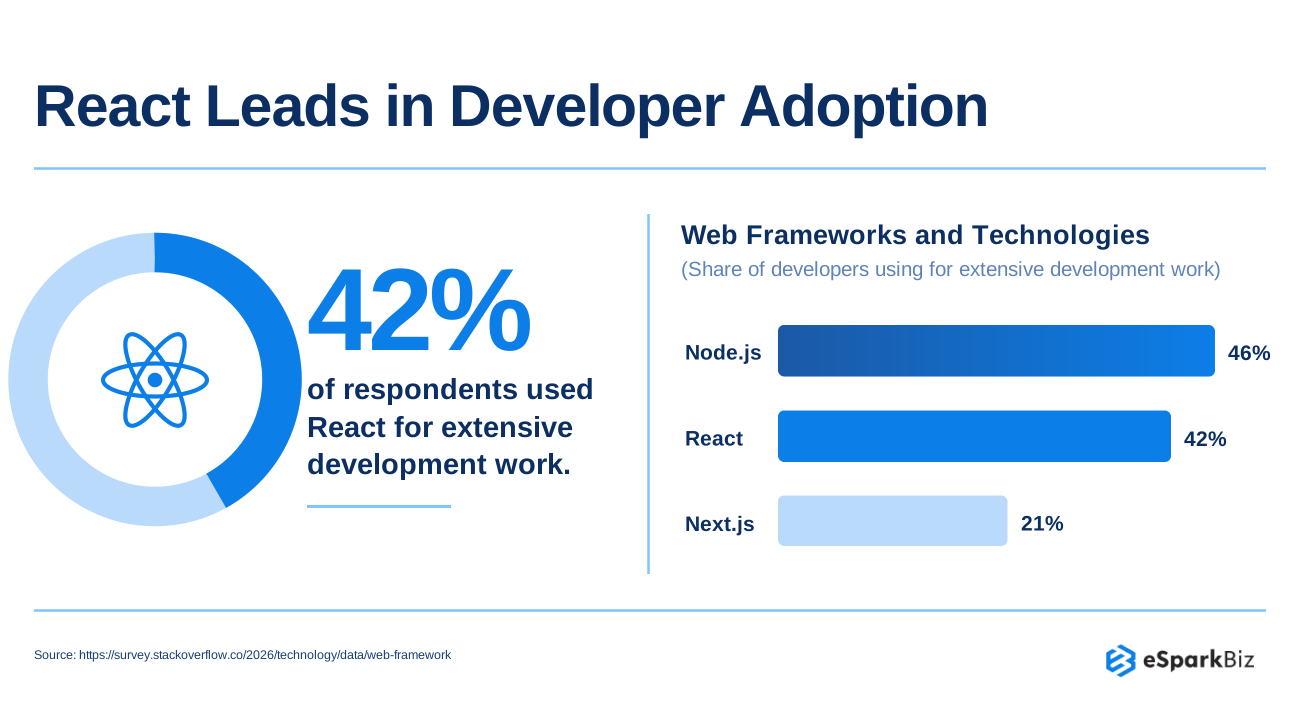
According to the Stack Overflow Developer Survey, 42% of respondents used React for extensive development work, highlighting its continued importance in frontend technology decisions. Frameworks can also change direction, architecture or licensing over time.
Therefore, your shortlist cannot rely on just downloads and GitHub stars. We benchmark ten React UI frameworks, see how they measure up against React 19.2 and categorize them according to their momentum. Then, you can measure each framework against the criteria that matter to your organization.
What Counts as a React UI Framework?
React UI Framework provides you and your team with pre-designed components, themes and design guidelines for creating consistent products.
Framework or Library? The 4 Part Test
Not all React UI libraries are considered frameworks. We will distinguish between styled systems and regular components using four criteria.
| Test | What it checks |
| Ready-styled components | Usable designs without custom styling |
| System wide theming | Shared colors, typography and tokens |
| Prescribed conventions | Consistent layouts, styling and tooling |
| Versioned product | Maintained releases, not copied code |
Is Next.js a UI Framework?
No. Routing and rendering are taken care of by Next.js, but it does not have any role to play with regard to styled buttons and themes. It has the App Router, which works on React Server Components, whereas UI components with client side hooks require a “use client” boundary.
A React UI library provides prebuilt components and styling. React handles views, and Next.js adds routing. UI libraries add ready-made buttons, forms, and themes to cut custom work. Options range from MUI to Carbon Components.
You may combine Next.js with a React framework to provide the solution for both architectural structure and user interface.
How We Picked These 10 React UI Frameworks
The React UI frameworks were evaluated on pragmatic grounds that directly influence your team’s software development process and strategic decisions about technology.
Six Criteria That Drive Every Pick
In what ways should a CTO assess a React UI framework? Consider the following six points.
- Recruitment: Are there any experienced developers available?
- Update issues: Will upgrades require any radical changes?
- Commercialization: Is the licensing issue sorted out clearly?
- Accessibility: Is it compatible with accessibility widgets and testing?
- React 19 and above is compatible: Is your React version supported?
- AI friendly: Can AI programming tools leverage its documentation and patterns?
How We Verified Each Claim
We use documented evidence rather than popularity alone.
- Official release notes: Confirm updates and compatibility.
- Outdated numbers: Keep comparisons tied to the latest published data.
Final check: Verify your shortlist with the heads of engineering, finance and security teams.
Top 10 React UI Frameworks at a Glance
Below is a list of the top 10 React UI frameworks for enterprise apps in 2026, all on one page. You can use the table below to help you create your shortlist. Each framework is categorised by styling approach, license, and best use case. Unmaintained kits are excluded
| Framework | Best for | Main watch-out |
| MUI | Enterprise applications and dashboards | Advanced components may cost extra |
| Ant Design | Data heavy business applications | Opinionated design requires customization |
| Mantine | Custom enterprise web applications | Smaller hiring pool than MUI |
| HeroUI | Modern customer facing web applications | Check licensing and upgrade requirements |
| Astryx | Teams seeking newer design systems | Verify maturity and React compatibility |
| Chakra UI | Accessible, theme-driven product interfaces | Major upgrades require careful planning |
| Fluent UI | Microsoft aligned enterprise applications | Multiple versions complicate adoption decisions |
| Carbon (IBM) | Enterprise products using IBM standards | Strong design conventions limit flexibility |
| React Bootstrap | Bootstrap based applications and migrations | Bootstrap styling limits design flexibility |
| Blueprint | Dense internal tools and dashboards | Specialized design limits broader use |
Decision tip: Consider these categories as editorial categorizations and not quality gradations. Ensure React 19.2 compatibility and licensing before choosing a framework.
Trending React UI Frameworks in Detail
Newer React UI frameworks offer modern features, but choosing the right one requires checking long term support. Here’s what to consider for each option:
- Best for: Those who want to incorporate new parts and design options.
- Reasons for sticking with it: Ongoing development, helpful functionalities and popularity.
- Watch out: API changes, Maintenance concerns and Upgrade costs.
- React check: Ensure compatibility with React 19.2 before implementation.
1. MUI: The Usage Leader
MUI provides a well developed React UI library built on Google’s Material Design concept. In addition, MUI X provides advanced components useful for complicated business applications.
MUI v9 became stable in April 2026, followed by v9.3.0.
Here’s what matters for your team:
| Factor | Key details |
| Best for | Enterprise dashboards and business applications |
| Why it stays | Mature components and MUI X |
| Watch out | Material styling needs brand customization |
| React check | Verify React 19.2 peer compatibility |
Fact! MUI is in the lead when it comes to reports of use, but shadcn/ui is catching up fast. Yet popularity shouldn’t be the sole criterion when choosing.
Our Take: If design patterns and components are important to you, then MUI should be on your shortlist. Don’t forget to check out MUI X licensing first.
2. Ant Design: The Enterprise Workhorse
Ant Design is a React based UI framework that is ideal for designing applications that contain lots of data. It comes with pre-built components that provide consistency in your designs.
React 19 is supported with version 6 and React 18 remains the minimum. There is also pure CSS variable theming introduced with version 6. Comparison table:
| Factor | Key details |
| Best for | Data heavy enterprise applications and dashboards |
| Why it stays | Extensive components and theme customization |
| Watch out | Larger bundles and distinct styling |
| React check | React 19 supported in v6 |
Example: Teams that have upgraded from Ant Design v5 to v6 no longer require the React 19 compatibility patch package separately.
Our Take: Choose Ant Design if you require sophisticated tables and forms. Assess the bundle size and visual flexibility before implementation.
3. Mantine: The All-in-One Pick
Mantine comprises more than 100 elements alongside a separate React hooks library. It features styling utilities along with form and UI elements.
Mantine 9 needs React version 19.2 or above. Groups that cannot upgrade to React right away may use Mantine 8.x.
| Factor | Key details |
| Best for | Custom dashboards and web applications |
| Why it stays | Extensive components and hooks library |
| Watch out | No dedicated commercial support path |
| React check | Version 9 requires React 19.2+ |
Did You Know?
The hooks library in Mantine handles all typical interface behaviors, thus removing the requirement to check each utility for functionality.
Our Take: Mantine is best suited to groups that require flexibility but lack the time and effort to develop each part. Examine the internal capabilities before adopting Mantine for core business applications.
4. HeroUI: The Tailwind-First Option
HeroUI, which was previously known as NextUI, is made up of React components that are styled using Tailwind CSS. It is for those who require up-to-date interfaces with the ability to customize styles.
HeroUI v3 became stable in March, 2026. It requires React 19 or later and Tailwind CSS v4.
| Factor | Key details |
| Best for | Tailwind-based customer-facing web applications |
| Why it stays | Styled components and flexible theming |
| Watch out | Version migration needs careful planning |
| React check | Version 3 requires React 19+ |
Migration Note: HeroUI v2 and HeroUI v3 do not normally play together unless there is extra configuration. It is important to test the components before migration.
Our Take: HeroUI should be considered if you have a team that is using Tailwind CSS. Review the needs for migration before moving to version 3.
Did You Know?
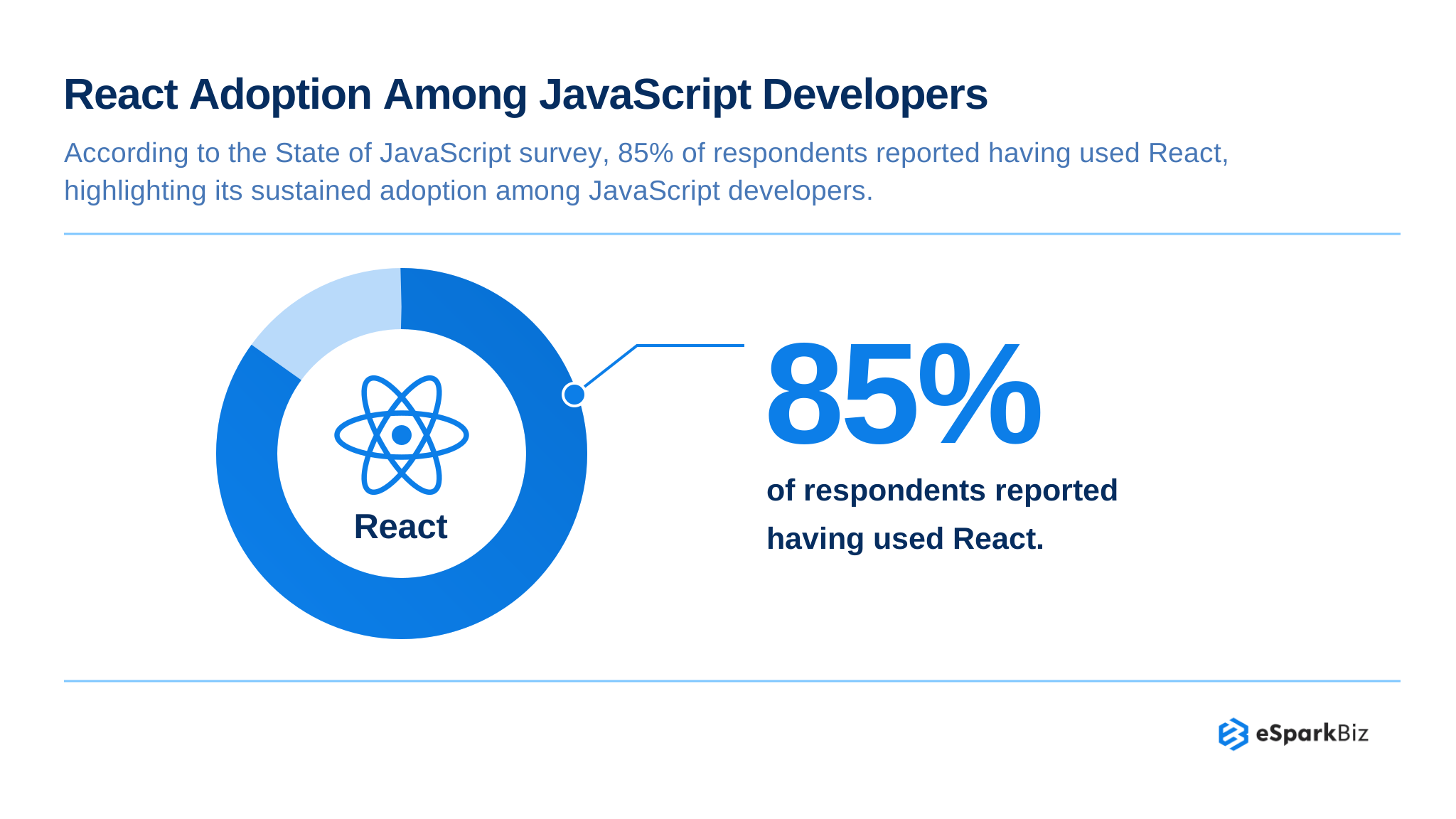
According to the State of JavaScript survey, 85% of respondents reported having used React, highlighting its sustained adoption among JavaScript developers.
5. Astryx: Meta’s New Design System (Beta)
Wondering if Meta’s Astryx design system is production-ready? It’s still in public beta, so release stability remains a concern. Start with a limited trial before considering wider adoption.
| Factor | Key details |
| Best for | React first teams testing modern systems |
| Why it stays | Extensive components and AI ready tooling |
| Watch out | Beta releases require additional validation |
| React check | Supports React 19 and later |
Did You Know?
Astryx provides more than 150 components that can be easily accessed via the MIT License. Also, it supports themes at the brand level, dark mode and templates.
Our Take: Astryx should be assessed if you are looking for an adaptable design system. Consider running a pilot first and then assess accessibility issues and beta release risks.
Steady React UI Frameworks
These React UI framework designs have components and design patterns that developers have used for years.
6. Chakra UI: Rebuilt, Still Active
The Chakra UI offers styled React components with flexibility to theme. The latest version, v3, contains certain changes in its architecture that need to be taken into account.
The Ark UI, Panda CSS and Park UI design systems make up V3. There is an option for a code migration from v2 to v3 in February 2026.
| Factor | Key details |
| Best for | Custom enterprise applications and dashboards |
| Why it stays | Flexible theming and active development |
| Watch out | Major rewrite requires migration planning |
| React check | Verify React 19.2 peer compatibility |
Migration Note: Though the codemod may assist in modifying the code, it cannot guarantee complete migration. Every component’s functionality, themes and custom integrations must be tested individually.
Our Take: Chakra UI is still an option to consider if your design requirements demand flexibility. Existing v2 projects need to evaluate the work required to migrate to v3.
7. Fluent UI: Microsoft’s Design System
Fluent UI applies Microsoft’s design language to React apps. It is appropriate for enterprise level development teams creating productivity platforms and Microsoft style user interfaces.
Fluent UI v9 is compatible with React 19 and relies on Griffel, which is a runtime CSS-in-JS library. The previous version, v8, is still being used. However, Microsoft urges developers to adopt v9.
| Factor | Key details |
| Best for | Microsoft aligned enterprise applications |
| Why it stays | Established design and component ecosystem |
| Watch out | Version migration needs careful planning |
| React check | Verify v9 React 19 compatibility |
Migration Note: Migrating from v8 to v9 is about component and styling changes. Check your current customizations before assessing migration efforts.
Our Take: Fluent UI is the perfect tool for developers working within the Microsoft ecosystem. Choose version 9 for future projects and assess transition costs for existing apps separately.
8. Carbon: IBM’s Enterprise System
Carbon is an open-source design system that can be used for enterprise apps by IBM. The “@carbon/react” package is a combination of components, styles and icons.
The Carbon library contains samples for React 19, but you should make sure about the exact range in the peer dependency list.
| Factor | Key details |
| Best for | IBM-aligned enterprise applications |
| Why it stays | Unified components, styles and icons |
| Watch out | Older packages no longer supported |
| React check | Verify official React peer range |
Migration Note: Support for the older carbon-components-react component has ended. IBM now uses @carbon/react and therefore project owners should migrate to this newer component.
Our Take: Carbon is appropriate for teams which prioritize enterprise design consistency. Assess component coverage, migration needs and React support before adopting Carbon.
9. React Bootstrap: The Familiar Choice
React Bootstrap integrates components of Bootstrap 5 within React based applications. It is ideal for teams familiar with Bootstrap’s styling and layouts.
This system is an ideal choice due to its proven ecosystem. However, before implementation, there are a few things that should be taken into consideration.
| Factor | Key details |
| Best for | Bootstrap based applications and existing projects |
| Why it stays | Familiar components and styling conventions |
| Watch out | Slower development momentum |
| React check | Verify official React peer range |
Real World Example: Frontend design of Eclipse SW360 utilizes React 19.x with React Bootstrap 2.10.x, with proof that the above combination has been used.
Our Take: React Bootstrap works well for organizations already using Bootstrap. Look at the release frequency and maintenance plan of React Bootstrap before you decide to implement it in your organization.
10. Blueprint: Built for Dense Interfaces
Blueprint is Palantir’s UI toolkit written in React for desktop applications that require sophisticated and data rich user interfaces. It offers specific components for dashboards and other internal tools.
In version 6.16.0, in June 2026, peer dependency React 19 was introduced. Older versions of Popover need to be addressed.
| Factor | Key details |
| Best for | Data-dense desktop-style business applications |
| Why it stays | Specialized components for complex interfaces |
| Watch out | Limited mobile-first design focus |
| React check | Version 6.16.0 supports React 19 |
Migration Note: Examine previous Popover behavior and test dropdown alignment before upgrading. Earlier Blueprint releases may similarly cause React 19 peer dependency issues.
Our Take: Blueprint is suited for teams that are developing internally complex applications rather than mobile-first consumer products. Test responsive capabilities and component integrations before standardizing.
Community Insights
According to a Reddit discussion, Vite is a better starting point for ReactJS beginners because it keeps development focused on client-side code. Unlike Next.js, it avoids additional complexity around server-side rendering and client-server architecture decisions.
Which Framework Fits Your Team?
The best React UI framework for you will depend on your current technological setup and needs. You can use the following cases as a guide.
Pick by Team Situation
Align your team’s goals with the frameworks that match your development needs.
| Situation | Pick | Why |
| Data heavy admin applications | Ant Design | Advanced tables and form components |
| Biggest hiring pool | MUI | Broad adoption and developer familiarity |
| Tailwind v4 stack | HeroUI | Built for modern Tailwind styling |
| Fast all-in-one development | Mantine | Components, hooks and form utilities |
| AI agent workflows | Astryx (beta) | AI focused tooling and component patterns |
| Microsoft ecosystem | Fluent UI | Consistent Microsoft design language |
| IBM-style enterprise tools | Carbon | IBM design standards and components |
| Existing Bootstrap code | React Bootstrap | Reuses familiar Bootstrap design patterns |
When to Wait Instead
Certain frameworks need additional planning prior to implementation. Here are three key factors to consider before making your decision:
- React below 19: Mantine 9, HeroUI v3 and Astryx do not fit unless React is upgraded.
- Beta releases: Pilot Astryx before considering wider adoption.
- Final check: Check compatibility and licensing requirements with your engineering, financial and security personnel.
🎥 Watch: React vs Vue: Which Frontend Framework is Better?
Expert Quote:
“Teams are now able to create design systems, brand systems, styling guidelines, and even behavior, and basically create the standards for their teams in the form of React components.”
~ Guillermo Rauch, Creator of Next.js
Risks to Check Before You Commit
There are various risks associated with choosing React UI frameworks. Check all these factors before adopting the company standard.
Six Risks, Six First Steps
Each risk needs a practical check before your team gets involved.
| Risk | Where it shows | First step |
| React 19 floor | Mantine, HeroUI and Astryx | Verify installed React version |
| Beta status | Astryx release maturity | Pilot before wider adoption |
| Major rewrites | Chakra UI v3 | Test migration with codemods |
| Package migrations | Fluent UI and Carbon | Audit dependencies and breaking changes |
| Licensing shifts | MUI X paid tiers | Compare licenses; model multiyear costs |
| Accessibility exposure | All component frameworks | Audit WCAG 2.2 AA compliance |
License Check: Measure Open Source Cores Against Paid Versions. Measure Total Cost of Ownership Over Seats and Years.
Accessibility Check: Conduct an audit to ensure compliance with Web Content Accessibility Guidelines (WCAG) 2.2 Level AA. Consult with legal advisors to ensure compliance with ADA requirements.
Expert Note: No system ensures compliance with accessibility guidelines. Test the flow of usage, not the documentation of components.
Common adoption mistakes include:
- Overriding default styles everywhere. Use a headless library (Base UI, Radix) if you need total design control without fighting existing CSS.
- Picking unmaintained kits.
- Mixing two kits.
- Skipping manual accessibility tests.
- Directly importing components app-wide.
A Five-Point Adoption Checklist
Run a one-week spike before committing. Prototype your hardest screens first:
- List required components (grids, charts).
- Check WCAG 2.2 accessibility.
- Rebuild one screen using your design tokens to test theming overrides.
- Measure bundle size impact.
- Review maintenance and license terms.
If you must override heavy CSS, a headless library fits better. Wrap library imports (like Button or Table) in your own folders to prevent painful future migrations.
Validate With Your Own Team
In addition to technical acceptance, your selection should be reviewed by your engineering, finance and security management teams.
Compare all factors of compatibility, migration effort, licensing expenses and compliance requirements to your needs before making any commitments.
Accelerate UI Development with eSparkBiz
If your team is struggling with heavy CSS overrides or lacks the bandwidth to build a custom design system, bringing in an expert partner can save months of engineering time. eSparkBiz provides dedicated React UI development teams to help you build, scale, and maintain your frontend architecture.
Core React UI Capabilities:
- Custom Design Systems: Building tailored, accessible component libraries from scratch using headless primitives.
- Framework Customization: Deep-theming existing libraries like MUI or Ant Design to match strict brand guidelines.
- Legacy Migrations: Safely transitioning outdated applications to modern, React 19-compatible frameworks.
Engagement Highlights:
| Feature | Benefit |
| Work Hours | US Time Overlap |
| Security | NDA-Protected Contracts |
| Code Rights | Full IP Ownership |
| Hourly Rates | <$25/hr |
Conclusion
Selecting an appropriate React UI framework is a matter of business risk assessment and not one of counting GitHub stars. Select two frameworks that satisfy your requirements and conduct a pilot with one of them.
Compatibility with React 19 and future upgrade costs need to be taken into account while making a final decision, since both of these factors can have an impact on the maintenance and development processes.
Frequently Asked Questions
What are the best React UI frameworks for enterprise applications in 2026?
MUI, Ant Design, Mantine, HeroUI, Astryx, Chakra UI, Fluent UI, Carbon, React Bootstrap and Blueprint are some good frameworks to consider. Select depending on React suitability, licensing cost, expertise and maintenance considerations.
How much does it cost to build an enterprise application using React UI frameworks?
Building an enterprise React application typically costs $10,000 – $150,000, depending on features, integrations and customization. Premium UI licenses may add $5,000 – $5,000 annually, while ongoing maintenance can cost 15 – 20% of the initial development budget per year.
What are the hidden costs of adopting a React UI framework for large scale projects?
Additional costs are those that are paid for, such as upgrading versions, customization, developer training and maintenance. Licensing and compatibility should be considered while estimating overall costs of ownership.
Should enterprises choose open-source or paid React UI frameworks?
Open-source frameworks offer ready made components without mandatory commercial licensing. Paid options may provide advanced features. Compare licensing restrictions, internal support capacity and multi-year costs before deciding.
How do React UI frameworks affect application performance and Core Web Vitals?
The component architecture and bundle size may influence application performance. Ant Design has to test bundle size, whereas Blueprint needs responsiveness verification. The article does not give any concrete numbers for Core Web Vitals.
What security and compliance risks should enterprises consider when selecting a React UI framework?
Evaluate compatibility of dependencies, restrictions related to licensing and accessibility guidelines. Verify conformance to WCAG 2.2 AA, ensure ADA compliance with legal consultation and consult security experts before framework selection.
How long does it take to migrate an existing enterprise application to a new React UI framework?
Migrating an enterprise application to a new React UI framework typically takes 4 – 12 weeks for moderately complex applications and 3 – 6 months for large systems. Timelines depend on component compatibility, custom integrations and dependencies.
Is it better to use a React UI framework or build a custom design system for enterprise applications?
React UI frameworks come with pre-styled components and common themes. If one requires customized interfaces, they can consider the framework’s flexibility and ease of customization.
Should we build a custom React design system or customize a library?
Customizing an existing library saves time and reduces development effort. Custom design systems offer better control over branding, accessibility and consistency across multiple products. Costs and timelines depend on project scope.
Which library suits a small fintech team?
MUI and Ant Design suit small fintech teams with their ready-made components, accessibility features and strong defaults. Limit custom theming to basic brand tokens to reduce development time and maintenance costs.
How to judge if a new library is mature?
Check its adoption history, release frequency, issue response times, documentation quality and available customization options. Also review copy-ready examples, community activity and license terms before choosing a library.