ChatGPT
 Google AI
 Perplexity
 Claude.ai
Vue.js is becoming more and more popular. As developers join and code bases expand, teams see larger code inconsistencies and more complex code resulting in more release cycles. This guide outlines best practices for project structure, components, data flow, optimization and security for teams in order to help them keep development discipline without adding extra steps to the process.
Vue.js projects are quick to start, but costs rise as features grow. Key Vue.js best practices, such as stable keys, clear component names, appropriately scoped state and safe templates, keep applications maintainable. Without them, teams risk delayed releases, duplicated work, regressions and harder code maintenance.
The statistics show that growth has already begun. According to BuiltWith, Vue.js is the framework used by over 4.5 million sites and over 88,000 sites in the top 1 million by traffic. Best Practices for Vue.js aim to provide teams a way to add scale to their sites and projects without losing control of delivery.
This guide covers building applications that are user scale, optimizing workflow for development and balancing technical risks to sustain reliable Vue.js product delivery.
Building Vue.js Templates that Scale with Growing Product Usage
Vue.js templates are predictable when using stable keys, separating conditional logic, removing calculations and optimizing code only when there is a clear quantifiable benefit.
Always Bind: key to a Stable Unique Value in v-for
The “key” in v-for should be bound to a stable, unique value. Using the index of an array results in components having stable identities as the list changes and often results in extra, unnecessary work.
{{ item.name }}
Never Combine v-if and v-for on the Same Element
It is best not to join v-if and v-for together as Vue evaluates v-if before v-for. Logic can be moved to templates or the array can be filtered with a computed property.
{{ item.name }}
Declarative Templates, Logic to Computed Properties
To maintain large-scale applications, derived values to be used in templates should be left to computed properties. The maintainability and readability of the application are improved and it helps to reduce the overhead of unnecessarily complex calculations
{{ item.name }}
Use v-memo to Skip re-renders in v-for with a Large Static Collection
v-memo should only be used to avoid expensive updates to large stale collections when identified by a performance profile. Implementing this would be premature due to the nature of the optimization.
{{ item.name }}
Establishing Vue.js Component Standards for Cross-Team Alignment
Consistent component architecture and naming conventions reduce ambiguity, preventing CSS and component collisions and giving growing teams a quicker way to understand ownership and intent.
These rules build on the official Vue style guide. Use its guidelines as your baseline, then add clear ownership, consistent naming prefixes and testing practices as your team grows.
Name Every Component with a Multi-Word Name that is PascalCased
Name your Vue components libraries so that they contain multiple words and are PascalCased like TodoList.vue instead of Todo.vue.
This avoids both a potential collision when referring to an HTML element, as well as making the referencing of the components during code reviews and when onboarding instantly recognizable.
- TodoList.vue
- UserProfile.vue
- OrderSummary.vue
Consistent naming practices become increasingly important as both the codebase and the development team grow as it reduces ambiguity during onboarding of new team members and building new features.
Let Prefixes Keep a Component’s Role Short and Sweet
Use naming prefixes to assist the developmental, debugging and code review process and reduce the work required when navigating through a codebase. Depending on a component’s intended role, certain prefixes can help define a component scope.
- Base: reusable UI primitives, such as Base Button.vue
- App: App Header.vue
- The: single-instance components, The Sidebar.vue
- Parent: TodoList.vue, TodoListItem.vue
Scope Component Styles by Default
Use
Global styles can be used for the purpose of design tokens and resetting UI elements, but are secondary to component level style definitions.
The same principle of separation applies to teams. Just as scoped styles prevent one component from affecting another, clear module boundaries prevent squads from interfering with each other’s work.
Give each squad its own module, such as billing, catalog or accounts. Allow squads to use shared code, but restrict access to each other’s modules. Keep shared code minimal and review every change to it.
Vue.js Best Practices Worth Knowing
Reddit community discussions also reinforce the value of the Composition API, built-in reactivity and selective use of ecosystem libraries. These choices should remain aligned with application complexity rather than developer preference alone.
Designing a Scalable Data Architecture for Growing Products
Vue.js state management best practices, wherein functionality and communication of components influence predictable state and debugging during incident response during app development.
Extract State Logic into Composables
As opposed to scattering functionality across various components, placing API calls and side effects as well as reactive logic into composables makes it possible to create modular units that become easier to test, maintain & troubleshoot.
// useUsers.js
import { ref } from 'vue'
import { getUsers } from '@/api/users'
export function useUsers() {
const users = ref([])
const loading = ref(false)
async function fetchUsers() {
loading.value = true
try {
users.value = await getUsers()
} finally {
loading.value = false
}
}
return { users, loading, fetchUsers }
}
Expose Composable State as Read-Only
Expose shared composable state through readonly() when consuming components should not modify it directly. Explicit mutation functions establish a controlled write path and make state changes easier to trace.
// useCart.js
import { ref, readonly } from 'vue'
const cart = ref([])
export function useCart() {
function addItem(item) {
cart.value.push(item)
}
return {
cart: readonly(cart),
addItem
}
}
The Cart component serves well as an example. Since Cart is defined outside of the composable function, it is shared and accessible to all component instances.
Props Down, Emits Up, No Exceptions
To provide transparency to dependencies and reduce ambiguity, all communications should be directed this way, through props and emits.
Avoid Losing Reactivity When You Destructure Props
Once props flow down, handle them carefully because destructuring them incorrectly can break reactivity. Copied values may stop updating when the parent changes them. Use toRefs to preserve reactivity. Vue 3.5 and later handle destructured props in
Match the State Tool to the Actual State Scope
Keep local and temporary state secondary and use Pinia when broader state is required. Unnecessary global state and event buses should be avoided.
// useAuthStore.js
import { ref } from 'vue'
import { defineStore } from 'pinia'
export const useAuthStore = defineStore('auth', () => {
const user = ref(null)
function setUser(value) {
user.value = value
}
return { user, setUser }
})
A simple decision rule is local state for local concerns, composables for reusable logic and Pinia for shared application state.
Aligning Vue.js Engineering Decisions with Business Priorities
No matter the Vue.js practice, technology leaders must consider the balance between delivery risk, product complexity and stage of growth. The following matrix correlates the majority of engineering challenges to the actions that should follow.
| Business Situation | Recommended Action | Priority | Why |
| Releases are becoming unpredictable | Review architecture and ownership boundaries | High | Delivery problems often indicate structural coupling |
| Developers repeatedly rebuild similar functionality | Establish shared component standards | High | Reduces duplicated engineering effort |
| Application performance varies across workflows | Profile critical user journeys | High | Focuses optimization on measurable business impact |
| State changes are difficult to trace | Consolidate shared state and composables | High | Improves maintainability and incident diagnosis |
| Legacy Vue code slows feature delivery | Refactor high-risk areas incrementally | High | Avoids unnecessary full rewrites |
| Application is growing but architecture remains simple | Introduce feature/domain boundaries | Medium | Creates clearer ownership as teams scale |
Structuring Vue.js Applications around Business Priorities
Product complexity, scope of features and team size should be used to determine application structure of Vue.js. A good application structure helps avoid unnecessarily increasing communication and application cost as it grows.
Good architecture doesn't just solve today's problem. It leaves room for what the product needs to become, long before anyone asks for it.
Small Application vs. Large Application
For small applications, a simple folder structure works well. As the application and the team grow, let complexity decide where to draw boundaries, domains and ownership.
| Application Stage | Recommended Structure | Leadership Priority |
| Small application | components/, views/, composables/, router/ | Establish consistency |
| Growing application | Feature-based folders with shared utilities | Reduce duplication |
| Large application | Domain or feature boundaries | Clarify ownership |
A simple rule keeps every team aligned: give composables, Pinia stores and Vitest tests a consistent location. New developers can find where code belongs and follow the same conventions from day one.
As the application grows to hundreds of components, organize code by feature rather than file type. Each feature should contain its own components, composables, store and tests. Move code into a shared folder only when two or more features need to reuse it.
Did you know?
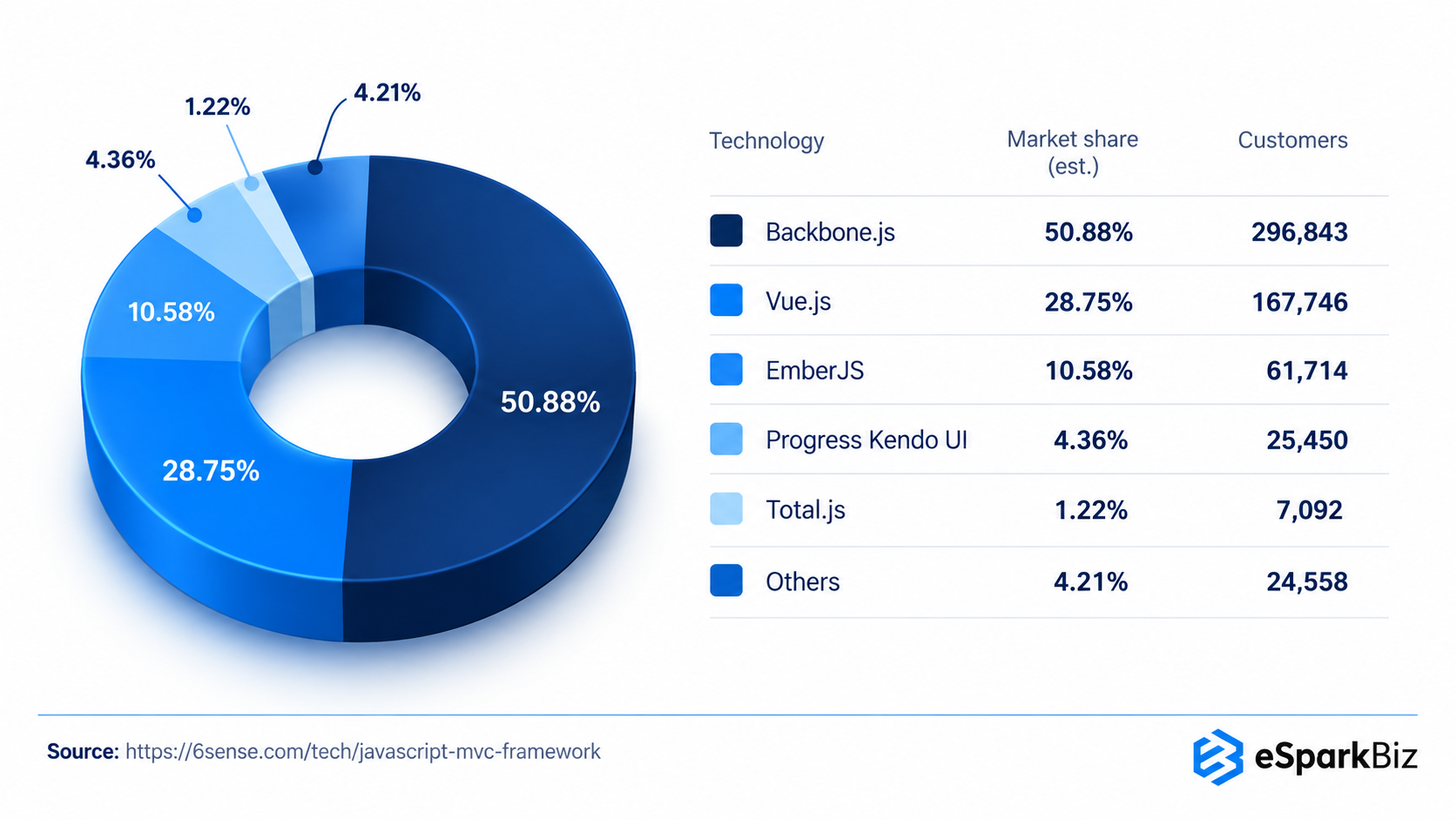
Within the JavaScript MVC Framework category, Vue.js holds a 28.75% share across roughly over 167,000 companies, second only to Backbone.js, per 6sense's data.
Managing Security Risk across Customer-Facing Vue.js Applications
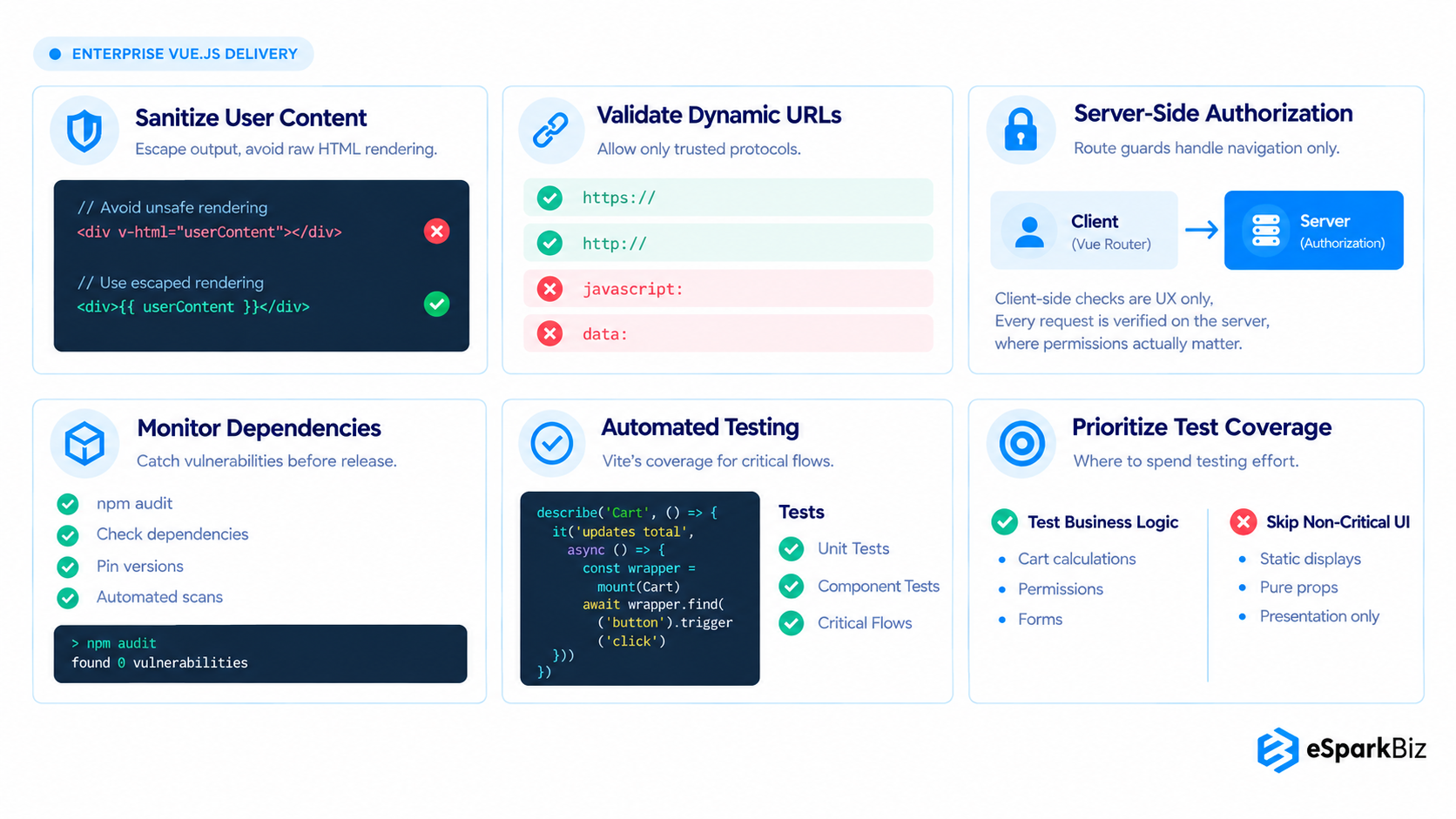
Vue.js security best practices include preventing XSS, blocking unauthorized access, validating URLs and removing vulnerable dependencies. Frontend fixes reduce risk, but business and data risks remain unless the server enforces security rules too.
Common security mistakes that delay releases include rendering user content with v-html, trusting unchecked URLs, relying on route guards for access control and skipping dependency audits. These gaps can trigger late fixes and emergency patches. Experienced teams reduce risk through the four practices below.
Never Use v-html
Do not use v-html with content provided by users, as Vue will not be able to securely interpret any arbitrary HTML as trusted content. Always sanitize your content before rendering and always consider that all the external values are untrusted.
{{ userContent }}
Rich HTML content should only be used if it is really needed. DOMPurify or similar libraries should be used.
Validate any Dynamically Bound URL
URLs that are controlled by users should be validated before being used as an href, src etc... attribute. Only allow trusted protocols and domains because redirects can make profile fields, comments or external links potentially unsafe.
function isSafeUrl(value) {
try {
const url = new URL(value, window.location.origin)
return ['https:', 'http:'].includes(url.protocol)
} catch {
return false
}
}
Try to keep the URL validation logic centralized so developers avoid checking for URLs across different components.
Implement Server-Side Authorization, Not Only in Route Guards
While Vue Router guards let users manage navigation and enhance the user experience, they should not be confused with authorization. Every protected API operation should verify the identity and authorization of the user on the server before responding with any data or executing any commands.
import { useAuthStore } from '@/stores/useAuthStore'
router.beforeEach((to) => {
const authStore = useAuthStore()
if (to.meta.requiresAuth && !authStore.user) {
return '/login'
}
})
Route guards manage navigation, not authorization. The lack of authorization on the server is the control that prevents unauthorized API access.
Schedule Regular Audits and Pins for Dependencies
Dependencies should not only be evaluated before releases, but should be continuously evaluated. During development, dependencies should be audited using npm audit or similar tools while keeping either control on version pins or range updates.
npm audit
npm audit --audit-level=high
Once a dependency is in use, there is a chance it is vulnerable. Continuous evaluation places remediation in a controlled engineering workflow, as opposed to remediation in a production workflow.
Test Vue.js Components Where Failure Costs the Most
Rather than aiming to increase the number of components tested, we should focus on testing business critical workflows. This primarily covers the workflows for which a failure would materially affect either the customer, revenue or business operations.
Set Up Vitest for Fast, Native Testing
import { mount } from '@vue/test-utils'
import { describe, it, expect } from 'vitest'
import Cart from './Cart.vue'
describe('Cart', () => {
it('updates the total when an item is added', async () => {
const wrapper = mount(Cart)
await wrapper.find('button').trigger('click')
expect(wrapper.text()).toContain('$1')
})
})
Vitest eliminates the need for a config layer as it integrates with Vite and can work with VueJS Test Utils. This package provides mounting, triggering events and setting props.
Tests for Business Logic Components Over Presentational
Company should prioritize cart calculations, permissions & forms, as they will directly control revenue, permissions and user experience.
A presentation component that shows some prop generally does not require its own testing suite, the actual component logic should be tested.
Specific tests targeted toward important workflows can prevent changes in dependencies from causing production issues in high-revenue potential sales journeys.
How We Wrote and Reviewed This Guide
The eSparkBiz team developed this guide using official Vue documentation, developer discussions and practical Vue.js project experience. Our engineers reviewed the code examples and checked the content for technical accuracy. Last updated in October 2026, this guide is reviewed periodically to reflect changes in Vue.js and its recommended practices.
How Did eSparkBiz Reduce Frontend Defects by 30%?
A B2C product business partnered with eSparkBiz to resolve issues resulting from inconsistent and unpredictable development, recurring regressions and scattered state logic.
| Business Challenge | eSparkBiz Intervention |
| Inconsistent component patterns | Established shared Vue.js development standards |
| Complex data flow | Refactored state and reusable logic |
| Regression during releases | Strengthened component testing practices |
| Growing codebase complexity | Introduced clearer feature boundaries |
The Approach
eSparkBiz modernized specific parts of the application rather than completely rewriting it. The eSparkBiz team focused on standardizing the architecture, creating reusable logic, optimizing high-usage workflows, and utilizing Pinia when appropriate.
Results from the execution:
- 30% fewer frontend defects
- Shorter release cycles
- More consistent code reviews and onboarding
- Less work required to maintain the product across teams
The real value was not just cleaner Vue.js code. The engagement provided the client with a more disciplined engineering basis that allows for continued product development without each change becoming a maintenance issue.
For projects like this review eSparkBiz's portfolio
Conclusion
Vue.js best practices create the most value when they align engineering decisions with product priorities. For technology leaders, the focus should be predictable delivery, controlled technical risk and efficient product evolution. The objective is not more process, but standards that help teams move faster without sacrificing maintainability or control.
Frequently Asked Questions
What is the best way to respond when an increasingly large Vue.js application uses more engineering resources for routine changes?
Treat it as a structural signal, not a staffing problem. Audit component boundaries and state ownership first, since most slowdowns trace back there.
How can teams implement Vue.js development standards without slowing down the development of features?
To adopt standards, automation of linting, formatting and dependency checks in CI should replace code reviews. This places the burden of standards execution on automation.
What types of Vue.js application architectures will accommodate large development teams and complex product requirements?
Organize by feature domain, not file type, with clear ownership boundaries per module. This limits merge conflicts and lets teams ship independently at scale.
When customer experience, conversion rate and application reliability start to be impacted by performance issues in Vue.js, what should businesses address first?
Issues that impact reliability, such as slow application load times, should be approached first. These can be addressed by reducing the size of the application bundle and improving the efficiency of application renders.
How can eSparkBiz stabilize a Vue.js application with inconsistent architecture when releases are slow and engineering costs increase?
To understand the source of inconsistency, eSparkBiz reviews component structures and state ownership. We balance release predictability without complete reworks by implementing consistent conventions.
How long does it take to clean up an inconsistent Vue.js codebase while feature work continues?
It typically takes 3–5 months alongside regular releases: 1–2 weeks for an audit, 2–3 weeks to establish standards and CI guardrails, then gradual refactoring, starting with the riskiest components.
We are a small SaaS team with an older Vue.js app and frequent regressions. What should we fix first?
Start with tests for revenue-critical flows and clear code ownership. Then consolidate shared state into composables and Pinia, establish component standards, and refactor legacy code incrementally.
Can eSparkBiz audit our Vue.js codebase and work with our in-house US team without a full rewrite?
Yes. eSparkBiz can begin with an architecture audit covering components, state management and testing, then provide embedded developers or a dedicated team with agreed US time-zone overlap hours.